 10:05
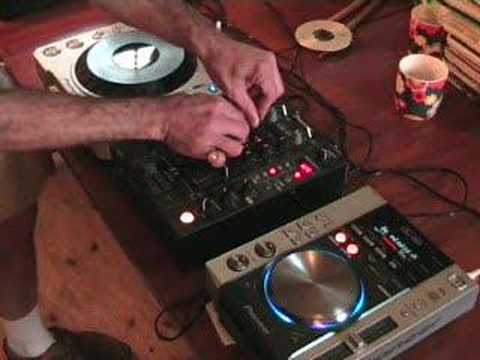
A demo of using the fx's on a CDJ turntable and a DJ mixer.
Contents of the video
0:00 In fact, I probably couldn't do them
Folks, Jonathan here. Now there's been loads of people who've been emailing me over quite a considerable amount of time and they've asked me to do a whole bunch of tutorials on using the actual effects features of a CDJ and a mixer. You know, what to do, what to use, when to use it etc. Now the trouble is, there are so many different ways of using the actual effects, it would seriously, it would take forever to do tutorials. In fact, I probably couldn't do them. The reason being is if you think about it, say you've got flanger. Now a lot of DJs, what they'll do, they'll press play or they'll press the button so the flanger is working on a certain track and then they'll let it play and that sounds fine but of course on a lot of mixers you've got a dial so you can increase and decrease the amount of flange you will get in that mix or in that song. But have you thought about it? Well...
Maybe if you take away the bass and the treble and just have the mid, then you could use flange just on the mid. And then let's say for example the volume is on full, you could maybe bring the volume down and increase it so up, down, up, down while the mid is being played through the flanger. You can also do that with just the bass. So you've got bass only utilising the flanger. Up and down with the volume control. Now, also, you've got the switch at the top that will go from phono to line. You can cut that so it goes like that. So if you think about it, just by using one effect and messing around with knobbly buttons on all your mixers and stuff like that. Knobbly buttons. It's a good job no one's listening here, otherwise I'd think I was right nutty. If you have a listener in this room, hold on. Yes, it's just me by myself. And the wind. Anyway, no.
Right, so of course there are so many different ways of using effects. What I'm going to do is give you a really dodgy demo. I haven't got any headphones on. Give you a general idea of what you can do. Hopefully in the near future I'll be doing specific tutorials on specific sorts of effects and maybe just using that effect and how to use it in the mix. If you want to know the names of the tracks, look to the side of the video and if you're watching this video just as it's been uploaded, please give me a little bit of time because I want to make sure I've got all proper names of artists and all that sort of bump. So what we'll do, this is real live TV by the way, in fact, the truth of the matter is, if you don't like these particular types of videos and you think the lighting's terrible, the sound quality's awful and stuff like that, I suggest you go and watch real TV.
2:33 I'll bung the camera like that
Because that's even worse than this. Right, here we go. Right, I'll bung the camera like that. And yes, this is punk television. This is how it should be. Right, now what we've done, we've got these guys set up. We're going to play this particular track and we're going to mix in this guy. And this track on this side is an absolute blinder. Right, here we go. Now first of all, alright, what you'd think is... Don't get that close. What you'd think is let's just press play. Like that. Sounds alright, but then again, how about this? On this guy here, what you can do, if you've got 1, 2, 4 and 8, so if you press 1, you get the first beat. Bam, bam, bam, and it loops it. 2, guess what? You loop 2 beats. 3, sorry, 3. 4, you loop 4 beats and 8, you lose, you lose, loop 8 beats. So check this out. Should we have some Blue Monday? Yeah! Loop 2, OK? Now what we can do here, we've got different effects on this guy, so I'm going to go to Echo...
Make sure we're on channel 1. Have a listen. Make sure we're on 4-4, so in other words the echo will be in time. Check it out. We've got the actual effect off. Go to filter. Remember when I said bass, mid and treble? Now again, if you're going to decrease the bass and the treble, you're only going to be left with mid. So if you're going to be doing this in the mix live, you want to make sure that the actual volume still stays relatively high. Because if you take away the bass and the treble and only left with the mid... If you're not careful, all the volume is going to drop and people are going to go like, what the hell's going on? So, increase the mid. Now then, let's have a listen now to the filter just with the mid. And what I'm doing as well, I'm always watching the actual levels here to make sure I don't go over. Going down, bass going up, bass. Bring the treble in. In time, we're going to take that off. Slowly bring the mid up. Now we're going to go to eight now.
5:55 We're back in now, but we're looping the eight beats
So we're back in now, but we're looping the eight beats. Let's go to flanger. We're out of loop there now. Right, what we can do now, like I said, I haven't got any headphones. I've got this one set up near enough at the beginning of the beat. So we can edit it. If we just press cue, what will happen? I put my finger on the cue button and the music will start. As soon as I take my finger off the cue button, the track will go to its original position. So we're going to edit this with an effect. So what we'll do... Set the channel select to number 2, so we have the effects on channel 2. Now we're ready, we're going to press cue. As soon as we take our finger off cue it'll go back to the beginning, but because we're on effect mode, we're going to have the effect while we're editing. And we're going to use the crossfade and go over with the crossfade. Right, effects ready. We do that again. There's a beat there, but there's no beat on this track. Let's put a beat into it. How about this? Sort of idea, and again...
It's about having a bit of fun and messing about, you know. This is the sort of thing you need to do when your mates aren't around you, no one's about, you can tell the next door neighbours to go on holiday for six months and make some noise. What can I say? I mean that was like all over the place but what I was doing, I was doing the one thing that every single DJ on this planet, I don't care how good you are or how bad you are, Every single DJ on this planet should do, should do, sorry, they should experiment. That's what it's all about. It's having fun. So what if, like I said, the beat goes off and it sounds terrible? It's about practicing. This is what, you know, I mean, you've got the stuff there, just mess around with it. Don't be scared and think, oh, flanger, I'd better not play with it just in case it makes a funny noise. Well, it's going to make a funny noise. That's what it's all about.
Now I hope this has been a help. I mean, I know that was absolutely as dodgy as whatever, but it doesn't really matter because it's me having a bit of fun and showing you that you can have some fun as well. So practice and enjoy.
This transcript was produced automatically from the audio of the video and may contain mistakes.





