 6:00
A look at the KAM KCD1100 dual cd player
Contents of the video
0:00 Maybe you should consider getting that
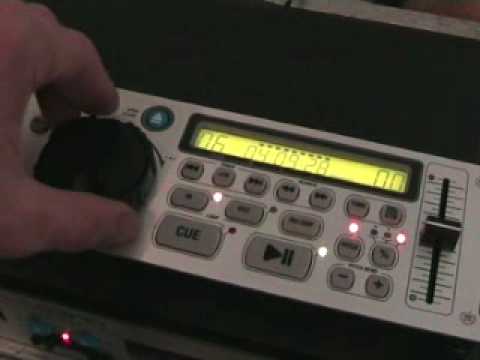
Alright folks, John Lawton here. In this video what we're going to do, we're going to look at this guy here. The reason we're doing this video is just to prove a point that you can mix on cheap and cheerful dual CD players. Now I've said to quite a few people, well people have been emailing me left, right and centre saying what can I buy, what gear can I buy? One of my first questions to them is how much can you afford because it's all about the price. If you can afford the best top stuff... Then maybe you should consider getting that. If you can't afford the best stuff in the world, then don't panic because you can be a DJ as well. Because there's stuff for like big bucks and little bucks. Right, what we'll do, we'll pause the camera and we'll have a close look and see what this little thing can do. Here we go folks, it's a two unit piece of kit. So what I mean by two unit, well actually it's two units and it's two units. The first thing I want to add to units is this is the first unit which is of course the control panel.
And then underneath here, you've got the area where your bungy CD's in. It's also two units because where we're talking about a 19-inch rack mount unit, which is basically what this is, this will take up two units in your 19-inch rack mount kit. And then also two units here, four units, which is basically that sort of size, you can see there, flight case. Alright, what have we got on this sucker? We've got pitch control, you can alternate from plus or minus 4, plus or minus 8, Plus or minus 16. So dependent on which of those lights is shining, logically dependent on if you're plus, minus 4, 8, 16. Well, basically quite logical there. Here we go. Let's press play and have a little mess around. We're on plus and minus 4 at the moment. As you can see, the light above the pitch control is shining and that will indicate that you're ready to use the actual pitch and the pitch will be utilised. Here we go. If I slow it down, it will only go to minus 4. Speed it up.
1:54 Eight, minus eight, plus eight
You get a plus four. And then back to the centre, we go to eight, minus eight, plus eight. The pitch has got quite a nice feel to it actually. It doesn't feel tacky. Minus and plus. Now a tip for you here, if you like beatmixing, ideally, if I were you, I'd keep it in plus or minus four, simply because you've got... Just pause that a second. You've got all this area to work with. And you will actually get a nice, smoother mix. If you go on to minus or plus 16, you'll find your movements are a lot more finer because there is one hell of a difference between here and down there. OK, let's put that out for a second. Sneezed, beg your pardon. Alright, what have we got here? Jog wheel. We've got an outside and an inside. Now, what's the inside and the outside all about? Well basically...
If we want to cue that up now right to the beginning, so let's have a listen. By the way, if you press cue, the music will start, take your finger off cue, it'll stop but it'll go right back to wherever the music started from initially. So let's just put that back to the centre position. So here we go again, take it off, and if we want the actual music to play, press play. And we can pause that, press cue again, it'll go back to the beginning. Now with regards to this guy here, let's see what happens. We'll press play. Now what this will actually do, it'll flick through the track. So if you move the outside of the jog wheel clockwise, it'll flick through the track to go forward. So let's say for example you're listening on your headphones and you want to wang it forward halfway through the track. Well you can do it like this. So bearing in mind that, let's pretend this is through the headphones. And then likewise, it's the opposite, anti-clockwise and it'll go backwards, like so.
3:52 1, put plus 10, we're
Now, on the top of the jog wheel, you've got a nice little area there, stick your finger in, and that's almost like a pitch bend. What you've got here, track search, pause that, 7, 8, 9, etc., and then you do plus 10, and you can actually go through to say 15, there's 12 tracks there, so if we go to 1, put plus 10, we're on 11 there, if you can see. So that's really, it's just a case if you've got like 5 million tracks on there. This doesn't play MP3 by the way, it can loop, So you can loop the track as well, you've got search here and you've got your normal countdown timer. Now what is quite good with this little geezer here, and this was exactly the same on the cheap Citronic CD player I had in the first ever gig log I did, and that is you've got this little relay button here. Now this is quite cool because let's say you're using this in some sort of function and you want to disappear and chat up someone by the bar or you know
What you can actually do is you can have a CD in this one and a CD in this one over here. And what you can do is, what will happen is it'll play the track from this side and then as soon as this side finishes it'll play the track from that side. And then as soon as track 1 finishes it'll go to track 2, track 2, track 3, track 3. Track 4, and guess what? You said it, track 4. So there you go, a little bit of an insight for you. Quite a nice piece of kit, and again, it's like I've said, you know, a lot of people out there haven't got a whole bunch of money, and you still can beat a DJ. At the end of the day, if you beat mixing, these are pretty good. I will give you a demonstration on how you can mix on these in a future video, so hold tight. Just bear with me for a second. So there you go, nice piece of kit. By the way, practice and enjoy. What?
No.
This transcript was produced automatically from the audio of the video and may contain mistakes.





