 24:21
Comparison Between a Vinyl Turntable and a CDJ Turntable
Contents of the video
0:00 Toilet, make yourself a cup
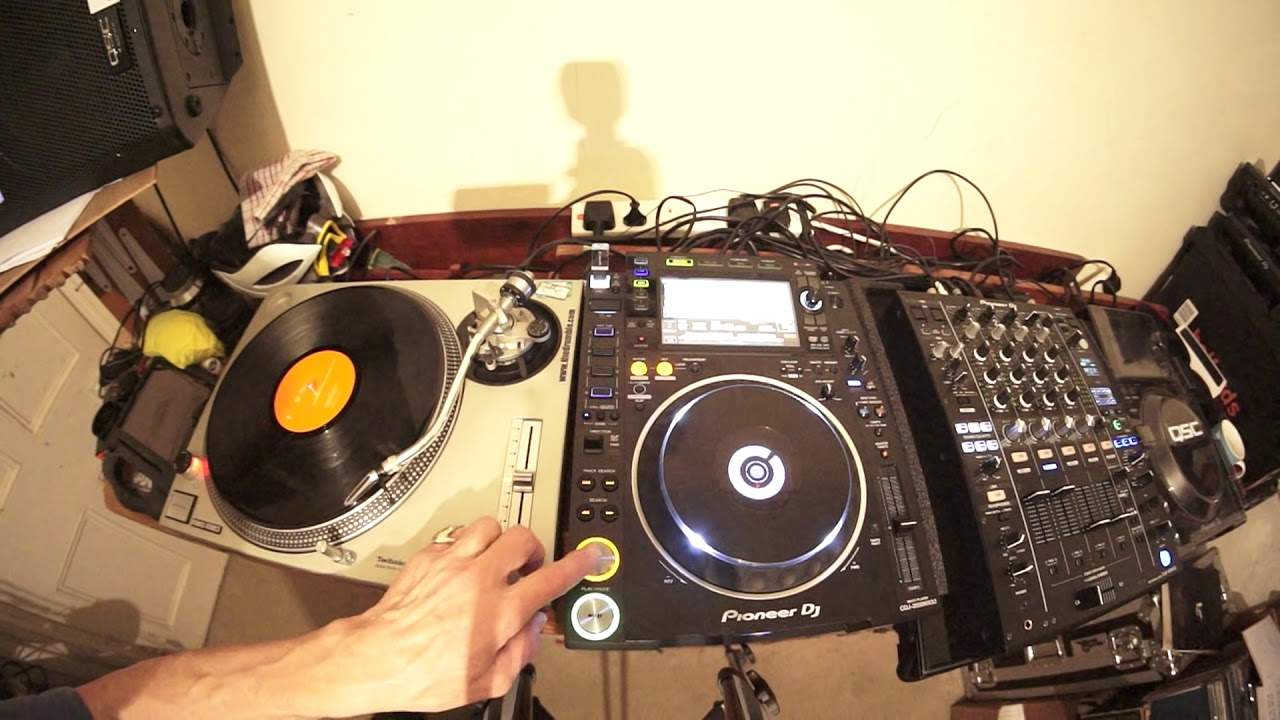
Alright, in this video we're going to do a comparison between a CD player and a vinyl turntable. Now, very quickly, if you're an established DJ and you know pretty much everything about the two and the difference between the two, then I highly recommend you stop watching this video and maybe go and watch a shopping channel, maybe go to the toilet, make yourself a cup of tea or maybe do some origami. Then again, why don't you watch a video on flower arranging? Otherwise... If you do not know or you're not familiar with, or you just want a bit more info, maybe you want to go into CD players or maybe you want to start going back to the old school original vinyl, then pay attention. This video could help you. Two tracks I'm using. One, I'm not going to mention because through...
Copyright issues, but I'm only going to be playing snippets of the vinyl track anyway. On the other hand, on the right-hand side here, we have a track by Whiny Entitled Archive from the Talisman LP from Hospital Records. There will be a link in the description where you can get more info on the tune. So what I've done as well is I've now set the CD player into what's known as vinyl mode. Now the objective there is to make sure we can get a very, very similar comparison. You know, we can almost judge which one is maybe better, which one's worse and are they the same? Is vinyl mode just as good as vinyl mode on a turntable? That would be funny. And then I'll go to jog mode or also known as CDJ mode. So first of all, let's play the whiny track. Skip it forward a bit. Now what I'm going to do now is press play pause. OK, so what's happened there? It has stopped the track. But did you notice it stopped bang straight away? All right, so check this out. Now by changing the vinyl speed adjust.
2:05 To do is just stop
I can make the track slowly speed up or slowly slow down. Right, now let's do a comparison with a real vinyl turntable. Put the needle on the record and... OK, so pretty much what I did there is something similar. Now, let's do it step by step so it's exactly the same. So, of course, the first thing to do is just stop it straight away. There, bang, stopped. The slow vinyl speed adjust, start and stop. Now the slow start is a little bit more difficult because when the turntable is on you have to press start and as soon as you press start the track will pretty much start straight away. There is a tiny amount of adjustment in between it going from standstill to the speed that it is which is 33.3 RPM at the moment.
But you can make it slow down by just turning the power off. So here we go, there. There, so I started it and stopped it. Now there's one way of being able to make that turntable slowly start and that is of course something that isn't advisable too much because you're putting a little bit of... Pressure on the motor, but if I start the turntable now, I'm actually holding the side of the platter. So I'm giving it a bit of force, stopping it from moving and I can do this with my finger. So all I did there, I pressed start on the turntable so I could feel With my finger against the platter, that there was a bit of motion there. It's a bit of friction. It's trying to pull away. It's trying to start. It's saying get your bloody finger off me. I want to play the tune. But what I did, I just slowly moved my finger away. Again, there's a bit of a technique to that and that will give you like a vinyl speed start which is equivalent to the vinyl speed start on the CD player if we do that again. But the speed start
5:05 Sorry, I had the volume down, beg your pardon
The CD player is a lot better than me doing that. Okay, so that's the first comparison. Now, the next one of course is in vinyl mode if we go back to vinyl mode. We don't have to put anything onto the platter because the music is on the thumb drive whereas to play a piece of vinyl, of course, we've got to put the needle on the record like that. So put the needle on the record, spin it forward and away you go. Now, another slight difference. Again, so if we skip track and go back to our original track, press play. Sorry, I had the volume down, beg your pardon. Here we go. There, it starts. Now, another slight difference here is that most dance tracks will start on the one in a bar. And what you will find with MP3s is that as soon as the music starts, whether it be the first kick, the first melody or maybe a female vocal or some kind of sound, the CD player will start at that exact point. On the other hand, with a piece of vinyl, when you put the needle on the record...
What you tend to do is put the needle before the audio so it's up to the DJ to find the beginning of the audio and you can only do that two ways. One is by having your headphones on the volume down and doing it through your headphones so no one can hear you which is the best way of doing it if you're doing a live set because the last thing you want... The DJ Tutor is a great example of what you can do to have the volume full up and you put the needle on the record, have a clanking sound while you're putting the needle on the record and then also spinning it forwards and backwards and the public hearing this. They don't want to hear that so I'll give you a demonstration of what they would hear let's say if you had the volume up and you were trying to find the beginning of the track. Now that doesn't sound too bad here but you imagine that being on a 20,000 watt sound system. That would be a bit stupid.
Of course, this is where there is a difference. With vinyl, you have got to find the beginning of the track. So, there. Alright, and again, there's a slight difference because let's imagine now we're doing a mix. There's a track on the right-hand side and you want to bring the track on the left-hand side on your CD player. Now, let's just get into a beat. So, skip it forward.
7:20 Vinyl turntable
Okay, there we go. So I've got that set up on the one in a bar. Now, if my judgment is correct and I'm pretty good at mixing and phrase mixing, etc., etc., all I've got to do is press that button and that track is going to start at its exact BPM that it was made to start at. On the other hand, let's have a look at a vinyl turntable. Now, this is the beginning of the track. There. That's the beginning. Now I'm not going to do anything, I'm not going to touch it except press play. Have a listen. Now that, I'm going to do it again. Alright, now listen closely because what happened was that first kick almost started to wind up. It didn't snap in. It had to have a little bit of time before it kicked in. Have a listen. Alright.
So there's a very big difference. Now again, if we go back to the 70s, 80s, early 90s when pretty much every DJ had a vinyl turntable, there was one way around that and again there was an element of skill but what the DJ would do was something like this. Now then, the difference now instead of earlier on was the turntable underneath is now moving. I have a slip mat. Now that slip mat is taking away all the friction from the piece of vinyl and the platter underneath, which means it's now free to move. So all I've got to do is just gently give it a little bit of a push away on that beat. That first kick should start straight away without any bang. There you go. OK, so that is a slight difference there.
9:42 I will explain and I'll show you
Now let's have a look at something else that's quite interesting. So what we've got here is vinyl speed adjust. Now on the CD player, we can if we want to at any given time start the track off very slowly and then let it glide up to its original speed and if we press play pause again, it won't just snap. and stops right away it will slowly glide to a halt so let's have a listen with the vinyl speed adjust set so have a listen okay so there there is it slowing down and this is it starting up slowing down and starting up now we can do something similar with a vinyl turntable but we can actually only do that properly The DJ Tutor allows you to play the track by slowing it down. I will explain and I'll show you. So let's play the track and while the track is playing, I'm going to turn, physically turn the power off with the power dial. Have a listen. There we go. See, can you hear that just sort of slowing down naturally? Alright, that is because there's no more power going to the turntable itself and...
It's just going to stop, but it's not going to snap stop. It's going to stop slowly. Now we can do the other way by starting it off slowly, but there's a bit more of a technique to it. Turn the turntable on. What I'm going to do now is I'm going to put my finger against the side of the turntable. So my finger now is actually holding the side of the platter. I'm now going to, well in a minute... A few seconds, I'm going to press start. Now, as soon as I press start, I will feel a bit of tension. There's going to be a bit of friction there in between my finger and the side of the platter. That's because the motor is trying to push that turntable forward but I'm not letting it. So what I'm going to do, I'm going to slowly take away the pressure from my finger and then...
12:03 Can you hear that I'm able, I'm now able to physically move the music
Hopefully, the turntable will start to slowly move. Now, this won't be as smooth as the CD player, but it'll be similar-ish. So here we go. There. OK, so again, that's a big difference. All right, so we have now both decks... We have them both paused up. OK, so... What I'm going to do now, again the CD player is in what's known as vinyl mode. I'm going to put my hand on the top of the CD player and move that forward. And now I'm going to move it back. Now can you hear that I'm able, I'm now able to physically move the music. Not only that, I can physically move the music as fast or as slow as I want to in a forward direction. Now, again, for the partially sighted I am now using the CD player. Right, let's do exactly the same now, or can we do the same with the vinyl turntable? So, and again they're both on pause mode so I'll put the needle on the record at the beginning, there. Alright, so now the track is, well we're a few beats inside the track so I'm going to do exactly the same.
There we go, exactly the same. Now also what's happening here is the platter underneath the turntable is moving a little bit, the same motion that I'm doing or very similar. That's because I'm putting a little bit of pressure on the piece of vinyl which in turn is putting some pressure on the slipmatch which in turn is putting some pressure on the platter itself which will make that move. So that's another similarity. Now there is a lot more, there's a great deal more and one of the most important parts really is about the speed adjustment. Now this is a Technics SL1200 Mark II and we have plus 8 and minus 8. So first of all what does that mean? Well plus 8 and minus 8 is all about the BPM. Let's imagine this, let's imagine...
14:43 CD player now what we can
This track, which it isn't, but let's imagine this track is 100 BPM. So in other words, in every minute we will hear 100 beats, BPM, beats per minute. Now if I was to move the pitch all the way to the minus 8 position, that track would no longer be 100 BPM, it would be 92 BPM. Bring it all the way towards me and it would be 108 BPM. Now, this is relatively old technology so it may be let's say 107.5 BPM or it may go down to I don't know say 93 BPM so it's not exact alright now let's have a look at the CD player now what we can do with the CD player is we can go from plus or minus six so our imaginary track of 100 BPM will be We can also go to 10%, 110 and 90. We can also go to 16%, 84 or 116. And we can also do the magical one, the crazy one, the effects one which is the wide feature which is 100%. So in other words...
Our imaginary track is no longer 100 BPM, it's 200 BPM. And if you take it all the way to the end, to the bottom, down there at 100, guess what? You won't hear anything because you physically stopped it. It's now at 0 BPM, so it's a great way of getting some kind of effect. Now again, because of copyright issues, I'm not going to play much of the vinyl, but what I will show you... is we will start the track from the zero point, from the center point on the pitch and then I'm going to slowly, no actually I'm going to quite fast put it down to minus eight then stop that track. While I'm doing that I want you to listen to the sound of that beat. Does the sound of the beat change? Now this is what I want you to listen for. So let's go back again to the beginning. There.
17:03 Is the track speeding up?
Did you hear it? It sort of went... Now, not only did it slow down, the sound of that beat dropped as well. What's happening? The key of the beat is dropping. Now let's do the opposite. I'm going to now go from the centre point and bring it towards me. Let's do exactly the same thing. This time, speed it up. Now what's happening is the key is rising, so not only... Is the track speeding up? The key is rising as well. So I'm going to do exactly the same now with the CD player. Let's get a plus or minus 10. Again, we've got the same track, Whiny Archive. Slow it down. Speed it up. Okay. Now, did you also hear there that not only did the track speed up and slow down, but the key seemed to rise? When I brought the pitch towards me and the key seemed to drop when I moved the pitch away. Now that is because what's happening is when you decrease or increase the speed of a track, you will not only increase and decrease the speed, you'll also increase the key of the track and decrease the key of the track, of course if you slow it down. Increase, speed up, decrease, slow down.
One of the best parts of technology, modern day technology for the DJ, beyond shadow of a doubt, and I'm pretty sure a lot of people will agree with me here, is the master tempo, also known as key lock. Because what that will do, that will make sure that if you speed up or slow the track down, it will keep the same key. Now on a vinyl turntable... You can't do that. Now, again, we're going into intermediate and advanced here, but very quickly, but of course beginners hopefully will take this on board and understand. With a vinyl turntable, if you're doing a mix and you have a track playing on the right-hand side, you have a track playing on the left-hand side. If you're able to mix the track on the left-hand side and only have to move the pitch around about 3%, then you will keep...
That track, pretty much the same key. If you go above or below around about 3%, you start to increase or decrease in semitones. Therefore, if you have to go above or below 3%, you may get the track in beat, but you may also end up getting that track out of key. So that needs to be, you know, you better watch that. You better listen and make sure you understand about this 3%. It's really important. On the other hand, with a CD player, you don't have to worry about that. You engage master tempo and the track now will speed up, slow down, but you will have the same key. Let's have a listen. Plus 10, minus 10. Now this is far more apparent if we go to the wide feature. Right, here we go. So at centre point, where are we? Centre point, about there. Speed it up, slow it down.
20:07 Let's disengage master tempo
Let's disengage master tempo. Hear that? The whole sound has dropped until it stops. Speed it up. Mickey Mouse time. Master tempo engaged. Okay, there you go. Now, I think the biggest difference, or one of the biggest differences, of course, modern day technology, sorry, you have a screen and you don't have to take off one MP3 and put a new one in because it's all there pretty much. On the thumb drives we've got today. But listen, all is not lost because if you want vinyl, excuse me, if you're really interested in using vinyl then of course you can use virtual vinyl, something like that. Now I've done a couple of videos on this anyway. This is Pioneer DJ rekordbox control vinyl so if I take that out of the sleeve we have a piece of vinyl.
Now I'm going to play this, so let's just take the needle off the record, put that one to one side for the moment, and I'm going to now play this piece of virtual vinyl. So let's have a listen. Wow. OK, so that is virtual vinyl. Let's have a listen to the key change. Now again, to clarify what I said earlier on about plus or minus 3%, so if we have a listen at the centre point...
22:14 You see, you can definitely start to hear a change in the key
You see, you can definitely start to hear a change in the key. Speed it up. Okay, so all is not lost because if you want to, you know, the purists out there will just use vinyl. But if you're a new DJ and you like the idea of going old school but at the same time, you know, you don't want to start spending a fortune on just one record, then of course you can use virtual vinyl. The beauty about using virtual vinyl is you get to use a real turntable. It's very tactile, you're touching, you're physically touching your music that you've got on your laptop. In brackets, always make copies of your tracks, stick it on an external hard drive and stick it in a cupboard somewhere in a safe. So, you can use virtual vinyl but again...
Another beauty is that once you've got your turntables and you're walking up the high street and there's a couple of second-hand shops, you go in there because your missus wants to buy something and you're just sat there like bored shitless. You look, see loads of vinyl, go and buy some vinyl because guess what? You can use real vinyl on it at the same time. So alright, now I hope this has been a help. Again, really this is for the new DJ but we're looking at a comparison in between the two. And also if you are interested... I'm still doing the DJ lessons via the medium of either Skype or Facebook, so if you'd like some one-to-one DJ lessons by myself, Jonathan Ellaskins, The DJ Tutor, there is an email right down there in the description. The lessons are an hour a time and I teach UK GMT time, Greenwich Mean Time, any time from 8 sometimes, depends where you are in the morning till 8 in the evening.
Thank you for watching. Don't forget to like and subscribe. Comment under there. Let me know your thoughts. Practice and enjoy. Thank you.
This transcript was produced automatically from the audio of the video and may contain mistakes.





