 9:46
Hercules DJ Control Instinct P8 Party Pack
Contents of the video
0:00 I have my trusty helper here, Blaze
Alright guys, I have my trusty helper here, Blaze. Say hello mate. Hello. Let's say hello in that direction, look. Wave. Hello. Alright, we've got in front of us a little controller that I would not really advise any professional pro DJ out there to buy, especially if you're going to be working in Ibiza or the Ministry of Sound because you'd look a numpty. On the other hand though, if you're up for a party, a bit of fun and some fun with the kids as well, then it could be up your street. It is... I'd say it's the smallest controller, one of the smallest. It's not the controllers, the smallest, not controllers. It's definitely one of the smallest controllers out there. All right, it's from Hercules. It's the DJ Control Instinct P8. Now, it comes with a deduced 40, which is the program which you can see on the laptop there. It's relatively easy to get going. In fact, no...
I'll be honest with you, it's very simple to get going. All you've pretty much got to do is plug in the USB. It's a mini USB, it's not a micro, so it's not your normal USB. It's the one in between. Mini USB into your laptop. You plug in RCA out. There's only RCA out into your speakers, ideally powered speakers. Alternatively, external amplifier into passive speakers. You've got your headphone socket there. And there is the little controller and it is very little. There it is. It's tiny, it's miniscule but even though it's small, it's like a ninja warrior, a midget ninja warrior. They look small, they look sort of very cute but they can probably pack a punch and this can because it's rather good fun. Blaze, would you like to press play? There we go. Now, alright, the tunes we're listening to, by the way, let me just bring you a little bit...
2:22 We can also do jogging, so you can jog the track forward or back
Up there, that's it. Okay. Right, tunes you're listening to by the way is from Karmic Power Records, Mr. Lenny Fontana. This one is entitled Raise Your Hand, so we'll be linking the description to Karmic Power Records. Okay, so again, it's sort of very basic. You know, you can do a bit of scratching. Hold on. Right, what we need to do, Blaze, is touch the top of that and move it. Do that. Go on. Okay, so we can do a bit of scratching. We can also do jogging, so you can jog the track forward or back. There's no pitch controls on it, but you can sync the tracks as well. So we have, what have we got on here at the moment? Cue. So what we can do, we can set cue points. So I'm just going to press shift and get rid of those cue points. Now Blaze, what I want you to do is press, see those four buttons? Press one of the four buttons. Press that one.
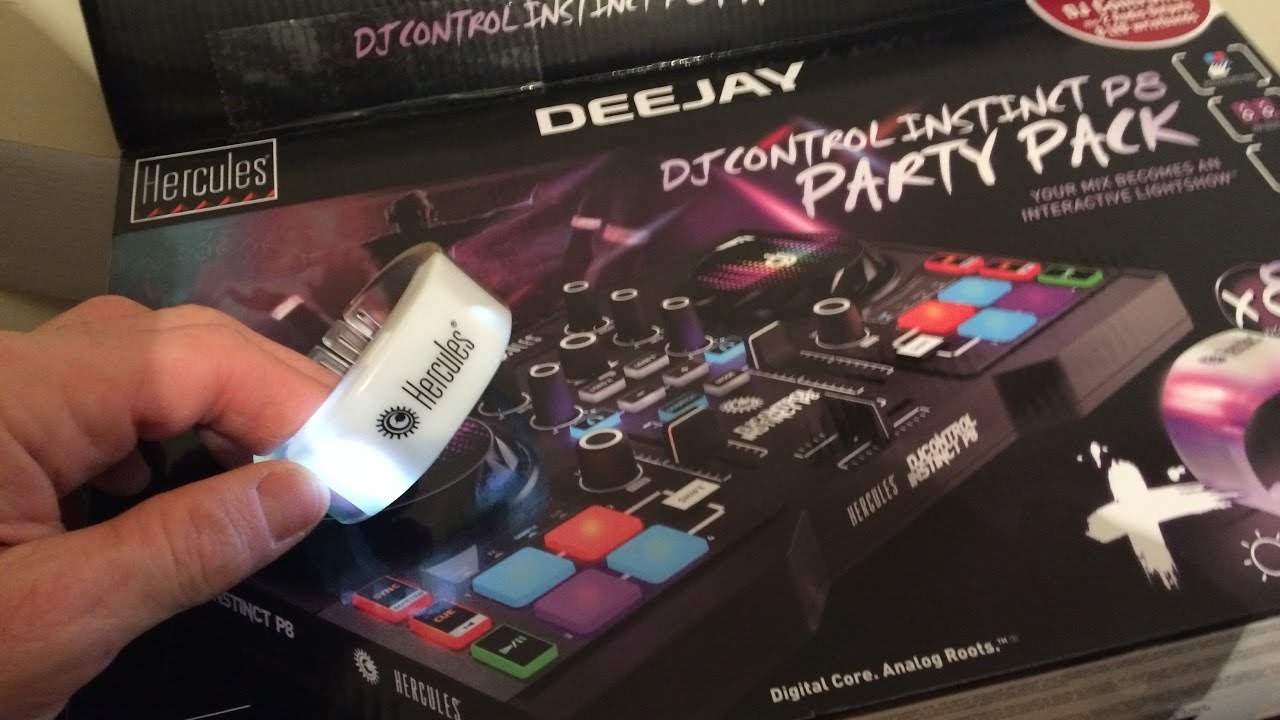
Press it. Come on. That one then. Press that one. Right, press it again. And again. And again. There you go. Alright, so what we can do is we can set cue points. You can also sample, you've got effects and you've got loop mode. Now this is pretty much the first video I'm going to be doing on this little controller from Hercules. And what I do like is... Let's imagine you're having a kiddies party. You've got a bunch of little kids coming along, you know, I don't know, you've got a daughter, you've got a son, you've got loads of friends. What the controller comes with is eight LED wristbands, these things, and they will flash to the music. That's quite cool, actually. I don't think that's actually gimmicky. I think that's a lot of fun. I mean, I could see people sort of going into a nightclub and wearing those. All right, so the controller itself is based on some of the high-end controllers. You have browse in the middle.
4:30 You open up the folder with the tracks you want to play
You can load the track, so can I just place, one second, let me just put it up here. No, I just want to put it up there, that's all. Put it around there like that. So what we can do is we can load, we can browse the files. There's high, mid and low. There's three band EQ, headphones, volume, mode, select, so when you want to select your effects. Sync of course, cue, play, pause, shift button to get rid of your effects or your cue points, crossfade and up-faders. So the program itself... Now again I do have the fisheye lens on so it may be a little bit difficult to see but the program itself is not dissimilar to all of the other high-end programs. Left hand side You've got your folders, so you go into your computer via here. You open up the folder with the tracks you want to play. There are the tracks. Click on one of them and then you've pretty much gone into that folder and you're good to go to select your tracks. So, go on then. No, it's alright, go that side. Now press play. Press play on that one. Play's in the mix. Okay.
Alright, so another tune here. This is Slapjack. People you don't know, this is the Mark Tiesto remix. Okay, so we can add loops here as well. They're from Loopmasters. So at the moment on the left-hand side there are trance loops that we can add and on the other side there's Deep House. I would have thought as well you can change those. Now again, it's... It's fun. This sort of controller would be great for a little house party to get your mates around, but I don't think, I'll be honest with you now, I don't think I would advise you to start using it at a professional wedding if you're going to be charging about four or five hundred pounds, euros or dollars. It's for fun. Alright, so... Again, if we look here, we have Deep House, I think that's drum and bass, sample packs included. Yeah, so we do have a few sample packs. Right, multicoloured pads, mix output, pressure detection, loop encoder, extend the features, yeah shift. So if you press shift of course you extend the features.
You've got what's known as review out on here which is of course your headphone out and it includes full deduced 40 degree Pro DJ software. Alright so there it is and it's compatible for Android, not sorry Android, PC and Mac. What I do like though is the 8 AD wristbands that it comes with.
7:56 Blaze, what do you think of this?
So, Blaze, what do you think of this? Do you think it's fun? What do you like about it? Oh, hold on. Go on then. Do that one, oh do that one. Move that. And also, what's quite cool, it's actually got slip mode. Seriously! If you don't know what slip mode is, it's where you try and talk over the... It's where you can... Oh, just one at a time. Once Slip Mode's engaged, you can do spin-backs and scratch. And if you're out of time in your spin-backs or your scratching, Slip Mode will automatically let the underlying track carry on playing. So even though you may be out of time, as soon as you stop your effect, the track will be in time. OK, so... Right, Blaze! Tell Daddy, what is the best bit about this that you like? What's your favourite bit? What's your favourite bit? Okay, he's getting into it now, right, and he's only five, okay. So, alright, I'll finish off with practice and enjoy. There will be a link in the description to this video. Again, most of my videos are very random. No editing, this is completely like...
Let's just start the camera and see what happens. But it's a bit of fun, alright? So big shout out to Hercules and I'll finish off. Thank you very much. Practice and enjoy. Nice one.
This transcript was produced automatically from the audio of the video and may contain mistakes.





