 9:19
LASERWORLD PRO 800-RGB short demo review
Contents of the video
0:01 We have in front of us the LaserWorld Pro 800 RGB
Alright guys, we have in front of us the LaserWorld Pro 800 RGB. It is a red, green and blue laser on steroids. And I've just been listening to Craig Mac Flavor in your ear to remix. Just tune. I'm serious. Absolute monster. Right, so it comes with its own little remote control. There's the battery. It is a bit of a faff but there is good reason for this. So batteries in the... Plastic package, I'm going to now lift that on. I've just got something that the kids had. There is good reason for this because these batteries, if you manage to touch accidentally both sides with your fingers, you will lose a bit of the power out of there. So that will fit on there quite nicely. Positive side up then with...
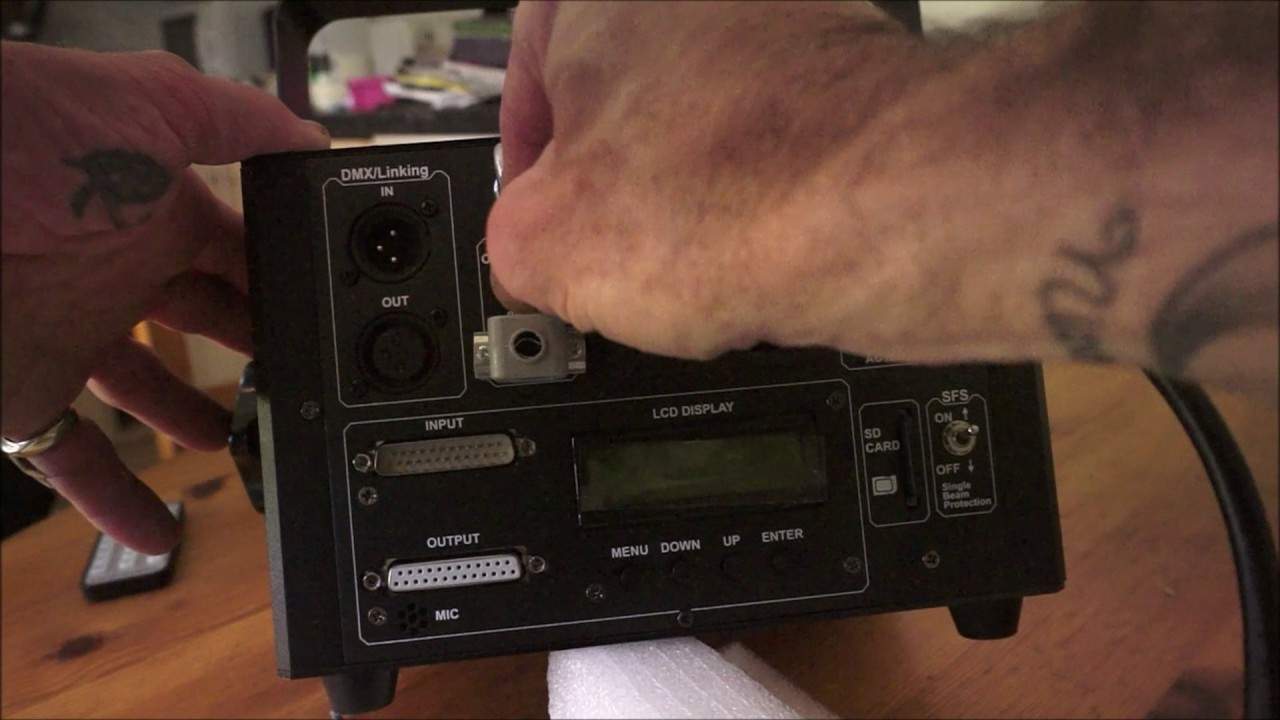
The remote control upside down, just slide that in place and there you go. So we're looking at the back of the LaserWorld Pro 800 RGB and I have plugged in the remote interlock. Way of looking at that is it's a little bit like this connects the power to the laser. If you haven't got that connected, the laser will not work. Also, I have placed the key in there and that is for laser on and off. So even if the laser itself is powered up, without the key in and without the key set to the on position, you will not get any form of laser image out of the unit itself. Okay, so many ways we can use this, very clever as well. We can use basic DMX in and out. If we want to, we can go one step further and use some programs via the Ilda in-out connection. Bearing in mind, in and out, so you can daisy chain these up as well. Small microphone there at the bottom left hand corner, that is of course if you're going to use the laser, just very basic sound to light. No problem in that, but...
2:16 This here is single beam protection
If you want it all singing and dancing, I highly recommend you use either DMX, ILDA or of course the SD card which it comes with. It comes with a 2GB SD card with a couple of programs already in there for you. This here is single beam protection. Now that's quite important. Let's imagine you are using this laser with a lot of people and you do not want it. To have a single beam. Now this is important simply because when using a single beam and that's scanning the crowd, you do not at all want that beam to hit someone in the eye because you've got 800 milliwatts potentially hitting someone in the eye. A small dot, that amount of power in a small area could potentially, not definitely, The DJ Tutor is available for purchase at Ellaskins.com.
4:08 Plug-in, 100 to 250 volts at 3 amps
On means that the single beam protection is on, you're not going to get that off, means of course it's off. Alright, so we turn the laser on and I'm going to, well actually I'm going to turn the laser off via the key there. I'm going to press power on, top right hand corner, nice green LED there showing that the laser's on, that looks pretty cool. Below that we've got the AC. Plug-in, 100 to 250 volts at 3 amps. Found to the left of that and below that we have our menu screen. Menu down up and enter. So of course very simple you press menu to get to the program that you want. You can press up or down to go through that program and then of course you press enter. Very important to press enter because if you don't
Then the program, the laser will go back to the program that it was prior to you running through the display. What I do like about the 800 RGB is it's not just a conventional laser that will give you lines of laser images. They're dichroic lenses in here and what they will do, they will pretty much split up The laser light to give you wacky images like this. So at the moment I'm using the little remote and this is 3DL, this is what's called the line effect. 3DP is the row effect so we're just going to go to that and 3DR is the 3D effect. Now that's quite nice. It's almost like a very warm kind of coloury image. It's pretty much getting into the realms of what you would expect to get with, let's say, a conventional moving head. But, of course, this is a laser. And there's the line effect. Now imagine something like that, let's say, if you had a DMX controller or maybe not DMX, more like running through Ilda.
7:02 The DJ Tutor offers a wide range of features and features to choose fr
Or if you've got a preset program on your SD card, you know, you can start having text on there as well and overlaying the text. Now that is a very nice effect. Now bearing in mind as well, the laser itself is roughly only about, I don't know, just over a meter from the wall and that's filling up that entire wall. So you imagine being in a room 10 meters away from the wall. You pretty much fill the entire room. That is pretty sweet. Very nice. I haven't had to do any programming, I haven't had to set anything. All I've done is turned the laser on and used the small remote. That's it. Very quickly as well, I'm just going through one of the modes where I can change the size. The DJ Tutor offers a wide range of features and features to choose from. The DJ Tutor offers a wide range of features and features
The camera settings, so there you go. So we can reduce the size of that. That's getting very, very bright. I can't look at that now. And I'm going to flick through, take it back up to 100. There we go. Can we go any higher? No, we can't. And I'm going to enter. There you go. So size has been entered. Alright, again, we've got auto mode, we've got SD program, we can go ILDA, DMX, what else have we got? Slave. The display on the back is relatively self-explanatory, but again I would always recommend looking at the destruction manual, also known as the instruction manual. Go to music. There you go, so now we're in music mode and if I keep quiet, which is very difficult for me, guess what? Tap on there and there we go, we have the laser.
Alright, so this is a brief insight into the Laser World Pro 800 RGB. This is definitely not a toy. It is relatively inexpensive but what we have, we have a full colour laser. Red, green and blue does not mean that you will only get red, green and blue. You're able to get whites and yellows. Pretty much the full colour spectrum, alright? So any info you want, check out the link in the description and it will take you directly to the Laser World website. And I will finish off with practice and enjoy. Thank you very much.
This transcript was produced automatically from the audio of the video and may contain mistakes.





