 8:02
Pioneer CDJ-850 Video 1
Contents of the video
0:01 Unit with a CD
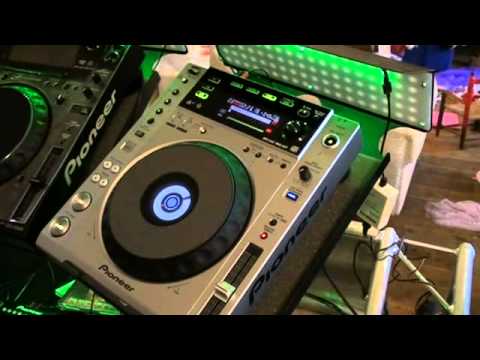
Alright guys, video number one on the Pioneer CDJ-850. This guy here is in a sense similar to the 800 Mark II but we're going up quite a few levels. Better sound quality, USB, quite a few more features as well. Now in video number one I'll just show you the unit with a CD. Video number two etc will use the USB and also will use this in conjunction with rekordbox as well. Now, if you're familiar with the 800, we can have the beat loops as well, but they've gone a step further with beat loops. Again, we've got a better readout and the jog wheel is near enough exactly the same size. Now, the 350 smaller jog wheel, what we're getting into here is the realms of decent nightclub quality. I've used the 800 Mark II and I will be honest with you, out of the 1000 and the 400...
The 1000 Mark III, the CDJ-400 and out of the 800 Mark II, I found the 800 Mark II had the better functionality where the jog wheel was concerned and vinyl mode. In other words, if you're a scratch turntablist and you like to do a bit of your wiki-wiki, it stuck there. It was almost identical as using, let's say, a vinyl turntable. So we'll put this guy on here. This is better off alone. At the moment, we've got loop. Loop on one beat. Flipped over there because I hit the beat select. If you listen to that, still there, hit it again. Beat select. Reverse. And don't forget as well, if you tag your music correctly, you will have artist and title coming up here as well. And again, exactly the same with the 900 and the 2000. You've got a dial there to go through your tracks through your folders, press down and you get through to that specific track. Here we go. Oh, reverse.
2:49 The groove isn't going to move unless the needle jumps
Very funny. You see, again, near enough exactly the same as the 800 Mark II. There's no movement there, so you haven't... One of the worst things in the world is when you're trying to do a tiny bit of scratching, anything at all, and you're trying to follow the music. That's not what you want. Because you're not going to do that with a vinyl turntable where the needle hits that groove, that precise point. The groove isn't going to move unless the needle jumps. That's precisely what a good quality scratch turntablist needs with a CD player. You need to be able to hold it there and if you want to wang it forward, bring it back to the same point. Stay at that point there. Okay, so if I have my finger there, same place. Hold on.
Okay, we can cue loop as well. We've got memory and we've got cue in and cue out. Don't forget as well, with the cue in and cue out, you can use the quantize on the software as well. So in other words, you use the rekordbox software, you can get a perfect loop and then you can bring it to this guy here. Now you notice there, it was slightly off. Here's a tip for you. If you want to do a loop and you want to make sure it's perfect, instead of looping it on the 1, 2, 3, 4, 1, Loop it on the offbeat. So in other words, what's happening is normally when you do a loop, you hit it on the first bass beat. Now there's a lot going on in that bass beat. If you try and loop it on the offbeat, then there's less likely or the audience is less likely to hear any fault in the loop. So I'll show you again. Let's go out of that loop. One, two, three, four. One, two, three, four. Okay, a little bit. We'll do it again.
4:53 There you go, that's pretty damn perfect
There you go, that's pretty damn perfect. And again it's about experimentation. If you think about it, if you wanted to form a loop, you could do this on the fly while the audience and the dancers are listening to this but at the same time if you use your grey matter all you've got to do is do this kind of thing on your headphones while the volume's down when you've got the loop then cue it up and then bring it in On the cue, in time with the music that's playing. At the end of the day, it's about using your bunts. Right, here we go. Let's go out of there. We've got master tempo again and we've got tempo. We can change it from plus 6 or plus or minus 6, plus or minus 10, plus or minus 16 and wide, which is fantastic. Again, very good point if you are a DJ who likes to do some good quality mixing.
Stick to plus or minus 6, plus or minus 10. If you go into the realms of 16, plus or minus 16, you're not going to have much manoeuvrability here. You're going to be trying to move this very finely as opposed to plus or minus 6 where you will have more control. And if you're a mixing DJ and you have it on wide and you try to mix a tune, it's going to be an absolute nightmare. Let me show you. Put it up to wide because there's so... There's too much of a change in between here and down here. In other words, what's happening is you're increasing it or decreasing it by virtually 100%. I mean, it is, it's stopped. Quick tip for you, alright? This is a good way of starting a track off. Let's get to the next tune. Right, let's find something with a bit of a vibrant beginning. Okay. Say we cue that up there. We'll get it on master tempo. Check this out. Here we go. Let's just turn it up a little bit. So you...
You're starting to speed the track up, but because you've got master tempo on, it's keeping the same key. So it's not as though it's going... Flip it down. All right, video one, CDJ 850. I'll put a linkable click in the description. Practice and enjoy.
This transcript was produced automatically from the audio of the video and may contain mistakes.





