 9:01
Pioneer DDJ-RB Short Overview
Contents of the video
0:01 First of all, the DDJ-RB is Pioneer's new entry level controller
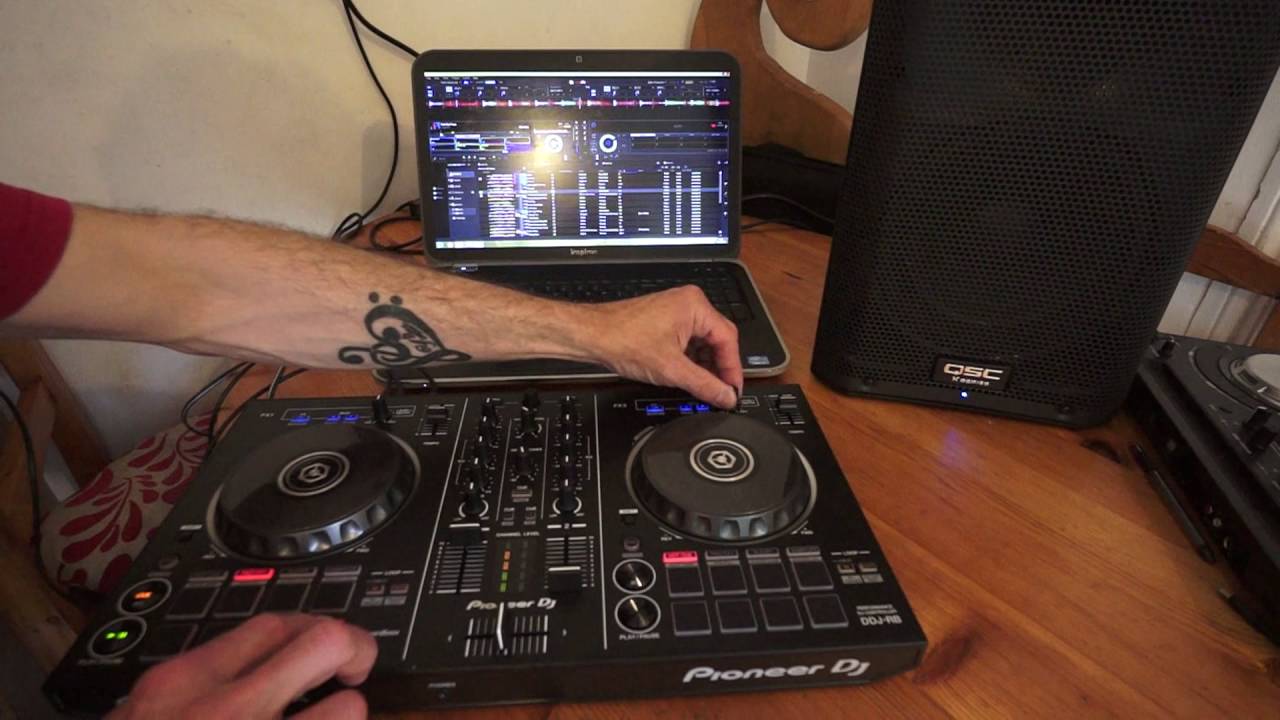
Alright guys, in this video we're looking at the DDJ-RB, a short overview of the functions and what you can expect to get. Now first of all, the DDJ-RB is Pioneer's new entry level controller. What they've done is they've listened to the new DJs out there and realised that the new DJ does not just want a controller with play, pause and one effect. They're demanding... To have a lot of the effects that the top kits will have without the cost. So in other words, let's say for example, you know, you want to delve into becoming a DJ but you don't want to spend a vast amount of money. But at the same time, you know, you want to, let's say, delve into the effects that the top high-end DJs or high-end DJs, sorry, the top DJs will use with their high-end kit.
So, for example, the RB, straight away, without setting any of the software, will give you the filter effect. Not only that, what Pioneer have done is, below each of the platters, they've given you eight pads, not just four. So some of the other entry-level controllers have only got four pads, but this guy here, the RB has got eight. Fantastic. By the way, the tune I'm using is Tell Me True. It's from Logistics. It's from Electric Sun. I believe it's the Electric Sun LP from Hospital Records. So in this video there'll be a link to Hospital Records and this track as well as of course the RV. Now as I said, filter is there ready to go as soon as you plug the RV in. Also the jog wheels They're big, they're bold, touch sensitive, so if you want to do a bit of scratching, you can do so. And along with the rekordbox software that comes with the controller, there's no latency there, alright? So you don't have to think that when you're moving the platter back and forwards, there's going to be a bit of delay. So long as your PC or Mac is compatible and it's...
2:17 You want is Skype or you
Thanks for watching, see you next time. More importantly, you haven't got anything else working in the background, so the last thing you want is Skype or you want to be on Facebook. If you're going to use any form of software with a controller, try and make sure that all of the other applications on your laptop are turned off, so the CPU can just concentrate on the program, which of course in this case is rekordbox. So, hot cues. We set 8 there. Let's go to pad effects. Now the top four pads will cut up the track, so have a listen. And then the four bottom pads will give you effects, so here's delay. Now of course we can also now add delay to the filter. Okay, Filter LFO, low frequency. Bit of reverb here and again I'm using reverb with the filter. Here's just reverb by itself. And then break. Now also one great feature.
What you can use with the rekordbox software that also you can use using the RB is a slip mode. Now, slip mode is normally associated with high-end kit. Now, you don't have a button to press on the RB but what you can do is go to the software and engage slip mode and now we've got exactly the same function as you would expect to find on the high-end CDJs.
4:18 Point where I set that hot
Okay, so what is slip mode? Now let's say for example I set a hot cue. So let's go back to hot cues. Now what's happening is when I press one of those pads while hot cue is engaged it will go to the point where I set that hot cue but as soon as I take my finger off that pad it will go to where the track We'll be playing as it's playing automatically, so if we have a listen. So my hot cue on the software itself is pretty much at the beginning of the track. Let's just go back to the track here. So this is where my finger is now and this is the hot cue. But the track is playing here, so the track will carry on playing but as soon as I press the hot cue it goes back. Here's Slip Mode Engaged and a Spin Back.
6:47 At the moment I've got MT engaged, which is short for master tempo
Now I'm going to disengage Slip Mode. Now there's a definite difference there. The first time Slip Mode engaged, no matter how I spin back, the track will keep staying in time. Without Slip Mode engaged, no matter how much I spin back... It's out of time, but of course that's depending on how good you are at spinning back. If you know how to spin back and you're in perfect time and you know where to stop the spin back, then of course you should be able to keep it in time. But that does come with a lot of experience. Now, the RB does have a very small pitch control. I would say that's the only downside to it, but that is, as I can see so far, the only downside. Now at the moment I've got MT engaged, which is short for master tempo. That will keep the key of the track while I increase or decrease the speed. And as with practically all other controllers, the centre point here is pretty much the brain.
Top centre, we can select the track so you can see on the software. I'm scrolling through the tracks. Either side load so we can load up tracks. Below that, master level. Below that, headphone volume. Cue for master. Also we can cue either side or both if we want to. We have the filter effect that you heard earlier on. Bass, also known as low, mid and high. Crossfade. And two up-faders. So there's no way of changing the parameter on the crossfader at all. All we have at the front of the RB is a mini jack headphone input, and then at the back, if I can just turn that, we have a locking mechanism here, we also have a USB in master right and left, and a quarter inch jack microphone with a level. Now also, this is bus powered. Now what that means is there's no need for an external power supply. So it's pretty much plug into your laptop and away you go. Now if you're interested, what you could do, you could have an external speaker plugged in to your laptop from your headphone out. You could go in from the RV into your laptop
Thank you very much.
This transcript was produced automatically from the audio of the video and may contain mistakes.





