 5:36
PIONEER SVM-1000 not just an audio mixer
Contents of the video
0:00 Again something like this is
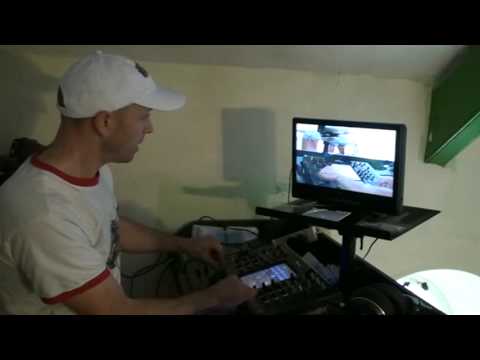
Alright folks, now first of all if you hear sort of funny noises in the background it's just because there's a couple of people walking up and down the stairs. Anyway, right behind me I've got the SVM-1000, a set of DVJs, got a screen there and I don't know if you can see but you can actually see my arm moving in relation to my arm moving on the screen. That's because behind me I've got another video camera there. Now again something like this is... It is and it isn't difficult to understand. It's difficult to understand because you maybe have to open your mind so much, your brain cells will start to explode. Then again though, it's relatively simple to understand because it's all very logical. Okay, what's the deal? Now again with the SVM, it's not just a four channel mixer, you can attach video cameras into it.
In essence, you can mix music. You can mix music DVDs, but at the same time, you can just mix video as well. So it's not just, it doesn't just do the one application. Now what I've done is I've gone into channel 1 using this camera. So if I just move, I can't take it too far because the battery's knackered on it. So basically it's a case of that's all you can see. It's alright, they can't see you, don't worry about it. So there you go. Right, can you see that there? There's the camera, and you can see there on the screen what we're looking at. So what I'm going to do is put the camera about there. Right, or shall I put it... Let's have a look, hold on. If I just put a couple of CDs underneath there, then we'll put it facing... We're not really looking at much here, are we? Anyway, this is Punk TV, guys, so... Right, OK, there you go. So we've got the picture now. If I just go a little bit closer to there, we've got...
1:48 You can understand what's going on, you can see my finger on channel 1
The SVM in view. Right, so if I just come back out again. Now, so you can understand what's going on, you can see my finger on channel 1. Channel 1 down, screen off. Channel 1 up, screen on. Now what I've got in the other DVD player is I've got some effects, some visual effects. No audio, just some visual. So that is the visual effect. Full stop. With that. So we've got the two working together. Now again, the faders on the SVM are exactly the same as audio faders. The difference being of course you can increase the sound at the same time you can increase and decrease the intensity of the video. So for example I can go from the effect on the DVD to just the camera. I can add the two together like so.
But what I can do now is I can use the effects. So for example, let's go to cube and bring that in and now I've got the cube effect. So what I'm going to do is just get the camera slightly closer. Now if you imagine, no I'm going to bring it out a second because I want to explain something. Let's say for example you're at a wedding and I'm going to do this hopefully in a gig log. I'm going to have a camera on the crowd. I'm going to maybe say have the camera targeting, let's say, The Bride. I could theoretically incorporate The Bride into one DVD that's playing effects or not playing, yeah, just the visual effects and then I can have a music, the music, the first dance on the other player. So we've got music, we've got The Bride in the video with effects and you can just wanger around and like just distort her really or just make her look pretty.
3:42 For example what I'm going to do now is move this around
So for example what I'm going to do now is move this around. Now you can see me moving it, finger on there and we're moving the effect so we're moving the visual effect with the camera itself and of course I can increase and decrease the intensity according to how much I want really. Now also again I can set cues so I've got hot cues, I can set loops, cue points With that effect, there you go. So you can see if I just bring that forward. And again, what I want you to do is just open your mind and think about things like this and work out what you could possibly do. Right, there you go. Let's have a look. Let's maybe change the scale of it. So called audio video mixer to just becoming a video mixer. So in a sense, maybe there's people out there who aren't necessarily DJs but want to just mix video. Well you can. And again, I'm only just myself getting to grips with this. It's an absolute minefield. But having a mess around with this, it's interesting, it's fun, it's a case of press buttons and see what happens.
Thank you for watching.
This transcript was produced automatically from the audio of the video and may contain mistakes.





