 5:26
Pioneer SVM-1000 Video 1, Like a normal dj mixer?
Contents of the video
0:00 Basically all the controls, well when
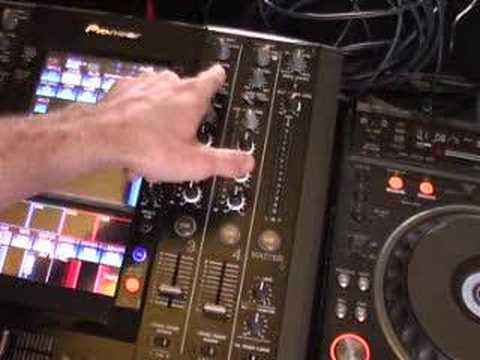
Alright folks, in this video we're going to be looking at this guy. It's the SVM-1000 from Pioneer. It's a video and an audio mixer all in one. It's basically all singing and dancing. Sadly it won't make a cup of tea for you in the morning but it'll probably do absolutely everything else. So I'll take the fish eye off the camera and we'll have a closer look at basically all the controls, well when I say all of them. Too many controls for one video so hopefully in this video I'll give you a basic idea of the basic controls. Hold tight. Right, like I said, this is a very, very basic video showing you roughly what this guy can do. Now first of all, you've got a crossfade. If I just put the camera down a little bit, so me by myself, that works near enough exactly the same as a normal crossfade on your mixer. The only difference is this can actually work the video as well. So if I just put the camera back in the normal position where it was to begin with.
We've got two channels on one side, and we've got two channels over that direction on the other side. So, what I'm going to do, I'm going to almost describe this as best as I can, almost put it together next to, say for example, a normal DJ mixer. So, a normal DJ mixer, you've got your crossfade which is down there. A normal DJ mixer, you've got your volume controls, you've got your low, bass, mid, high, Audio trim, or sometimes they're known as gain controls. Then here, this is where it starts getting slightly more different because you've got DVD and line and phono. So in other words, this is where you can start plugging in your DVD players. Also, this guy here which is completely different to a normal DJ mixer, this is video trim. Now what that is, if you imagine you've got audio trim, that will increase and decrease the volume on each individual channel.
1:59 Above here we've got video input
Video trim will actually increase and decrease the actual brightness of the video on the screen. So in a sense it's like audio but the difference is we're increasing video as opposed to the actual sound. Then above here we've got video input. You can have DVD, video, S-video or we've got video EX here. Now we've got near enough exactly the same on channel 2 and then if we... Actually go over to the other side of the mixer now. We've got another two channels here, channel 3 and channel 4, low, mid, high. We've got audio trim, the same here, DVD, line there in the middle and digital, video trim, DVD, video and S-video. Now very quickly as well what I do like about this which is very very similar to a lot of mixers and that is you've just got little things like this.
3:27 For your actual level control for your headphones, you've got cue and
You can have the crossfade set, so you can have these two channels on A, you can have these two channels on B. Alternatively, you can swap them around, so you can have those two on A, those two on B. Alternatively, if you're old school, you can just set to through and then you can just use the volume controls. So in a sense, it's very, very similar to a normal DJ mixer. For your actual level control for your headphones, you've got cue and master. So if it's set to cue, you can hear only what you're actually listening to when you're pressing your cue buttons. When you flip it over, you're basically going to be listening to what the master output is throwing out. Headphones, mono split or stereo. You've got here fader start, channel 1, 2, 3 and 4. Here you've got mic, mic off, mic on or talk over.
Now basically what talkover is, is if you can't be bothered to move the volume controls up and down while you're talking, when it's set to talkover, it'll actually decrease the volume for you while you're actually talking. Bass or low and high, that's your EQ for your microphone. Microphone level 1, or 2 sorry, there, microphone level 1, that's your input. Now this here, what you can actually do there is you can plug in an external video camera. So for example, you could plug in a normal box standard video camera, face that at the crowd and you could actually use that, use the video footage in the mix. So for example, you've got it plugged in there, you could have, if you can see there, channel 4.
And then that would light up here, channel 4, so wherever this is facing we can have that on channel 4 and we can actually use that in the mix as well. Maybe we can't get audio but we can definitely get the video. So apart from there's effects, I mean believe me there is no way on God's planet I could do a tutorial and show you all the knobbly bits on this in 10 minutes because it would take... A considerably large amount of time. So one video, quick video for you on this guy here, alright? Looking at a general sort of idea and hopefully in the near future as I get used to this, I'll be doing more and more tutorials, demonstrations but slightly more in depth. Practice and enjoy.
This transcript was produced automatically from the audio of the video and may contain mistakes.





