 8:22
The EVERMIXBOX4 All You Need for Your DJ Set to Record Upload and Stream
Contents of the video
0:00 Something first
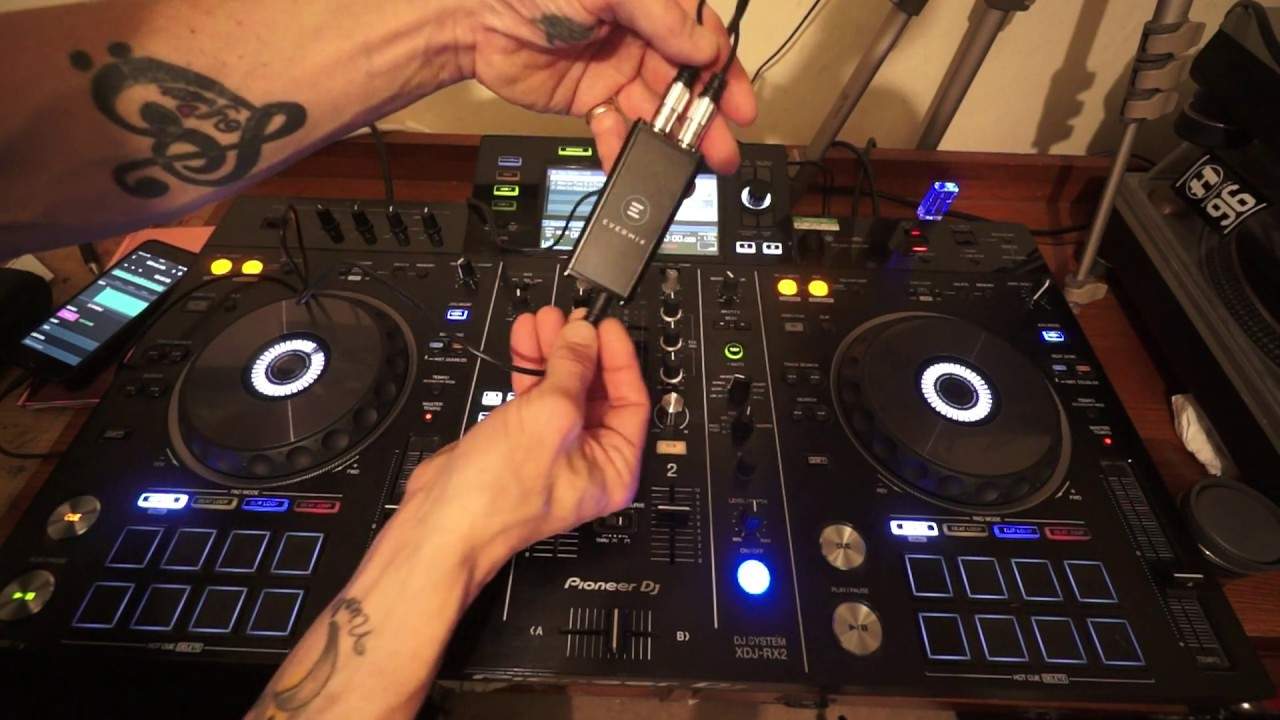
Right, this is my first video on the Evermix. So let me explain something first. Quite often when you buy a piece of kit it's massive, loads of buttons and knobs and stuff like that but you're very disappointed. It's big and bold but it doesn't do much. On the other hand... Sometimes you'll find something that's small and petite but is worth its weight in gold. Well, I actually think this is, and it can fit, there you go, in the palm of my hand. What is it? Well, it will record your set in bloody good quality first of all. So what you get with the Evermix is you get a box, you get of course the Evermix interface, you get RCA leads, I think it's a seven pin lead to your iOS device and you also get the quick start guide. And the only disappointment, the only disappointment is you get this stuff that you can pop. And come on guys, there was like three or four left for me to do. I mean, that was it.
Anyway, right, moving swiftly on. Okay, so what does it do? How does it work? Let me just open my phone up so we can get going. Now of course if you're at a gig and you're concerned about running the phone battery down, don't worry because there is there a mini USB jack, sorry, a mini USB plug there so you can plug in a cable into let's say One of your ports on your laptop and you can charge your phone up at the same time. So it's very, very clever actually. You will need to download the Evermix app which is of course free and I have plugged in the RCA cables from the output of the XDJ-RX2 at the moment. I think it's either the RCA master output, could be the rekord, I'm not sure, I couldn't see but ideally from the rekord.
If you're not too sure, then you can always go booth out and then use the booth dial to set the levels. And I'll show you the levels in the Evermix app very shortly. Now at the moment you can see that's flashing red. That is telling me that it's not receiving a signal. Now there is a lot to this actually. I really do like it because very quickly as well. Let's imagine you want to do a set on YouTube or Facebook or any other... I don't know, any other website out there where you can do live streaming. Is it Pinset or something like that? I'm not sure about that one. And, you know, you're using your phone and you've got your phone set up, the camera's on, you're using the mic off the phone and you may get very good imagery but the audio is going to be rubbish. Well, you can actually use this for recording your live set while you're on Facebook using your phone or on YouTube.
3:49 What I'm going to do, I'm going to click here, record next set
And that's very clever because it means you get proper stereo quality and no one can, you can't hear anyone in the background. There's nothing worse than trying to do some sort of set and using the mic off the phone itself. Okay so what I've done like I said I have plugged in from the RX2 So what I'm going to do, I'm going to click here, record next set. Right, so there you go. So we're ready. Now we have a choice here of setting the recording quality, 320, 192 or WAV. So I'm going to stick to WAV. And let me just press play. By the way, the track I'm going to be using is Alex Flo Farrow and JJ Farrow, track entitled Real Love from Karmic Power Records. Just a snippet of it so you get an idea. Now what's happened is the app has recognised that there's audio coming through. Don't know if you saw that but no audio and now tap record button to start audio.
Now also, if we have a look at the piece of hardware as well, we can see that's red. As soon as I press play to get some audio it goes blue. Now that tells me that it's receiving audio. So all I'm going to do is tap the record button and now that's recording. Okay, bearing in mind as well at the moment the phone isn't being charged but as I said earlier you can charge the phone at the same time. OK, let's just sort of skip it forward. OK, and stop. There we go, stop. Right, now it doesn't stop there. This is where it gets very exciting and not so much ingenious, but it gets... It's easier for the user because I honestly believe gone are the days now where you record a set, then you have to put it into... or record it on Audacity, then change it to an MP3, then just mess... So much messing around, it's ridiculous.
5:41 For example, I could put garage there, done that
What I would like to say as well is that there's only a certain amount of, for example, if you get notifications or calls, it will interfere with the app. So the best thing to do is to put your phone in flight mode while you're recording, as soon as you've finished recording, off flight mode and you're good to go. Right, so what we can do here, we can add genre. So for example, I could put garage there, done that. Add an event. So there you can put the event where it was, you know, grandma's 80th birthday party. She happened to like garage a bit of rave and drum and bass on the side. Gran's B-Day. Gran probably would need a B-Day. Oh dear. Don't get any better. Sorry about this. Location next. I'm going to put new key.
Where I live, sort of close to, Q-U-A-Y, venue, my home. All right, that's funny. All right, this is the great thing now, sharing Mixcloud and Soundcloud. So you can link your mix in Soundcloud and with, I think one or two more clicks, that's it. Bang, your mix is straight up there with the gods. I'll just put done for now. Okay, so there you go. So if we go back, Now you can see there are two mixes. So if we go here, Grandma's Birthday Party, there, and press play. Give it a second. There it is. You're just listening to that off the phone now as well. Go back, rave. I just did this quickly earlier on. Press play. There we go. So this is an ingenious piece of kit. It's great because it means now that...
Something like that in your back pocket, you haven't got to worry about having bad audio if you want to record your set. Now I will be doing a little bit more on this in the future. If you go to the description of this video there will be a hyperlink to the website where of course you can get a lot more information on this. There are other videos out there and I will endeavour to put more content on the web so there you go. Thank you very much indeed. Practice and enjoy. Nice one.
This transcript was produced automatically from the audio of the video and may contain mistakes.





