 8:36
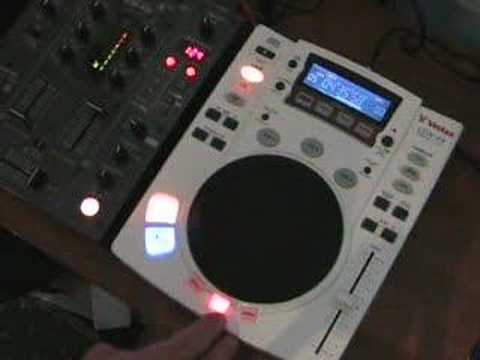
Video request, A look at the Vestax CDX-05 . A few features.
Contents of the video
0:00 Someone's asked for another quick demo on this guy here
Alright folks, Jonathan here. Someone's asked for another quick demo on this guy here. It's the Vestac CDX-05. So we'll have a quick look and I'll pause the camera and we'll put it a bit closer. Sorry. We'll pause the camera and we'll have a closer look. Hold tight. Alright, here we go. The track we're going to be messing around with is a track by Little Louie and it's entitled French Kiss. Here we go. Right, again, think about it now. I have said this before in other videos. If you've got effects on your mixer and effects on your CDJ turntable, if you've got, say, three on this guy, the CDJ, three on your mixer, you haven't only got six, you've got loads because you can, like, have a jig around and just add one to the other. So, for example, the filter effect's on here. Now notice I'm doing it in time with the bars and phrases. So instead of just having a mess around, have a listen to this. Here we go.
1, 2, 3, 4, 5, 6, 7, 8. 1, 2, 3, 4, 5, 6, 7, 8. 1, 2, 3, 4, 5, 6, 7, 8. 1, 2, 3, 4, 1, 2, 3, 4. There you go. Now also right, what I've got here is I've got an echo feature on the mixer. So I'm going to set the echo. Let's have a listen to the echo first by itself. Now let's put the echo with the filter. Filter first. Oh, losing my voice. That's all it's talking to you like, I'll tell you what. Now we'll add the echo. There you go. So that'll give you a general sort of idea. Okay, we've got filter on this, we've also got delay. Now delay, in a sense, is a bit like an echo. Now the last thing you want to do is start doing that in the mix. So ideally, if you're playing the other CD player, get the actual delay set in time with the beat and then wang it back over.
3:02 On this guy now, we've got something, a scratch mode
So, for example, let's say you're listening to this through the headphones. There we go, we've nearly got the beat going on top of the other beat. So, for example, let's say you're wanging... You're listening to that side. Yeah, that was a remix over that side. Right, okay, so that's... Oh, goodness me, I'm not on anything, I promise you. That's your delay, right? Here's your flange. Okay... On this guy now, we've got something, a scratch mode. Now, I must stress, if you are a turntablist, you do not want to buy these particular CD players, alright? Now, no one's going to shout at me because at the end of the day, if you're a proper turntablist, you're not even going to be buying CDs, you're going to be buying vinyl, period. The reason being, for scratching purposes, this is fine just for messing around and having a bit of fun, but it does have that sort of digital sound effect
Which isn't really good. If you want to sample a tiny, tiny fraction of the music, you can hear that digital sound. I'll give you a demo. OK, you can hear that. But if you want to just do a little bit of scratching and you're not that bothered, then have a listen. It's brilliant. That's fine. Now break. Press break. Press play pause. So that's it. You've knackered your setup or you've finished and then the next DJ can come along and start off again. It's got reverse, and then you can loop. Bloody hell, my nose is running today, terrible. Glad you're not here. Right, now there's some important factor here. Right, basically this has got your usual, it's got master tempo. So in other words, if you click the master tempo, there it is, then when you slow it down, it will stay at the same key, tone, feel, but the speed will slow down. Also, that's exactly the same when you speed it up. The key, the tone will stay exactly the same.
But you'll speed the speed, so you will increase the speed of the music. Now here's an important factor that I must stress for every single CDJ turntable across the board. This is my tip and hopefully anyone who's worth the weight in salt or gold or chicken poo will understand what the heck I'm on about here. Gotta go close to this particular pitch control here. Now this CD player along with quite a few others What you can do is you can set the actual pitch control to, and this is very important for people who want to beatmix, so pay attention. If you, I'll start again. A lot of CD players, you can set this so you can have either plus or minus six. So in other words, if you set the CD player to plus or minus six when you go to plus...
5:49 Minus, you will only have
You will only have up to plus 6. When you go to minus, you will only have to minus 6. If you set it to 10, plus or minus 10, exactly the same. Plus 10, minus 10. Or 50. Plus 50, minus 50. Or plus 100, plus 100 or minus 100. I'll give you a quick demo of what I mean. So press play. We'll start it off again and we'll do the pitch range say to plus and minus 100. So I'll give you an exact idea. There you go. And up to plus 100. Right, now we'll go now to say just plus or minus 6. So we're going to go to minus 6 and to plus 6. Now the easiest way of explaining this, if I put this now to plus 10, now I'm going to have a real close look at this area here. Now if you can see, you've got these gaps. Now we can see 1, 2, 3, 4, 5, 6, 7, 8, 9, there's 10 gaps.
What it would mean is every single one of those gaps is minus 10. So in other words, you are moving that in between that area there is minus 10 and then above is plus 10. So theoretically, if this pitch control was just on plus or minus 10, you would be moving this all that distance. If this pitch control was on plus or minus 100, You would be moving that pitch only that amount when it was on the equivalent of plus or minus 10, when you would be moving it that amount. Now for someone who is mixing, this is very important. You do not want to have this pitch on plus or minus 50 or plus or minus 100 at the very most. Ideally, for someone who beat mixes, you want it plus or minus 10 because then it means...
You've got more control over your pitch control. If you've got this on plus or minus 50, you'll find you're just moving it tiny fractions and you're probably still not getting it in the mix because there is too much difference in your movements. So I hope you can get the idea there, right? So just a quick sort of preview into this guy here. It's the Vestax CDX-05, do beg your pardon. And you've got a sampler on there, you've got your usual sort of cue features. There's a lot more to this than meets the eye. To be quite honest, you know, you'd have to spend like 5 or 6 videos of 10 minutes each doing everything with regards to this particular CD player but I hope this is a help. Anyway, what can I say except practice and enjoy and have fun.
This transcript was produced automatically from the audio of the video and may contain mistakes.





