 6:38
A look at a Graphic eq or equaliser, What doest do? i
Contents of the video
0:00 Graphic equaliser
Alright folks, now then, in this video what we're going to be doing is I'm going to show you a graphic equaliser. Okay, now you're probably going, what is a graphic equaliser? Now then, on your mixer, more than likely you will have three little knobbly bits. One is bass, low, the other one is mid, the other one is high or top. Now then, bass is the boom, boom, boom sound. It's like your vocals, your melody, that kind of thing. And then the top is the hand clap, the high sound. But did you know... I mean that is really a graphic equaliser but it's called a three-band equaliser. Now did you know that you can get fifteen band, you can get five band, you can get thirty-one band equalisers. But A what do they look like? B what do they sound like? And C what is it like when you mess around with them? Now first of all very quickly
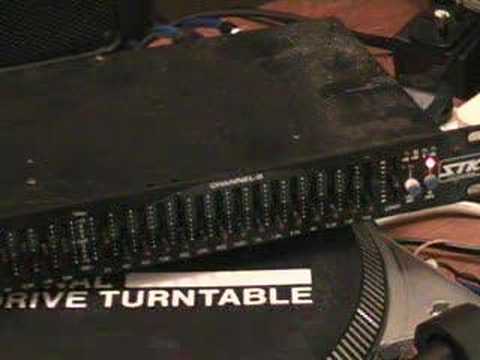
I mean, what do we talk about when we're on about frequencies? Now, frequencies in music are measured in hertz, kilohertz. One way of looking at it is one hertz and the other one bloody kilohertz. The hertz is the low bassy sound, the dum. When you start going into kilohertz, you start getting to the really high pitch. Now then, I'm going to show you this little thing here, right? Now then, that guy there... is basically a graphic equalizer. Now this is a stereographic equalizer, okay? Now if I pan close there, right, you can see a load of little red dots and sliders. Now up to that middle bit, okay, if we were going to just look at there, that point, that is basically one channel, alright? So, if I wanted to EQ, if I wanted to get a really, really pristine sound out of my mixer, what I would do
I would basically go out of this mixer and then from the mixer into, mind you bearing in mind that we do have digital effects that can do just the same. This is an analogue effect but what I would do then is I would go out of the mixer into this guy here, the graphic so I'd go from say right out of the mixer into right here from the graphic into the amplifier and then the same on the other side. So what I'm going to do now, I'm going to show you The difference in sound by messing around with a graphic equalizer. Now this one is 1, 2, 3, 4, 5, 6, 7, 8, 9, 10, 11, 12, 13, 14, 15 channels, alright? Okay, so what we'll do, we'll just put it about there, I'm going to play a tune and you can have a listen, alright? Really this is just like a demonstration to show you...
2:45 What a graphic equaliser does, alright?
What a graphic equaliser does, alright? Now then, the tune I'm going to be using is The Wigs and it's a track entitled Rising and it's on loaded records, okay? So here we go. Right, what I'll do first is I'll set everything so there's no... well, when I say flat, I mean flat is really in the middle, okay? But I'm going to have all of these EQs... All the sliders all the way down completely, alright? So we've got a close-up, we'll put the volume up and we'll see what happens. Here we go. That's your treble! Now, you have a listen. You need to get a really good sound. Make it really deep, like a clubby sound. Or we could make it sound as though it's coming out of a tin can, which is awful, but watch me. Here we go. That's nasty, that is. Bloody hell. Right, so there you go. Ooh, blinking out, you don't want to look at me that close. Crikey.
4:45 I mean that is basically a graphic equaliser
Right, so there you go. I mean that is basically a graphic equaliser. Now they used to be used quite a lot through the 70s, 80s and 90s but of course nowadays you've got a box about that big, a digital box. DBX I think they do something called a Drive Rack PA which basically has a graphic equaliser, it has all sorts of other EQs, it has limiters, crossovers, I mean you name it. It'll actually make a cup of tea from the backside of it if you ask it politely. But there you go. is basically a graphic, okay? Now that's what it does. So in other words, when you look at your mixer and you see three knobbly bits, that one has got 15, alright? Now if you think about it, some tunes, you listen to it and you can hear like a... It's almost as though there's a bass beat coming in the background. And then slowly it builds. The volume doesn't necessarily build, but what happens is the mid and top slowly comes in. And the melody comes in.
Now, that in essence really what you could do if you got yourself like a graphic or something like that. You could play a record and you can actually slowly start to bring the bass, sorry, slowly start to bring the mid in, the high, the treble and mess around alright? That's really, I mean apart from you can do that, I mean the whole idea of a graphic originally was simply this. When you had a new PA system in a new venue, in a new room Quite often, even though those speakers may have sound fantastic in say one room, as soon as you bring them into another room they sound different. So the reason for a graphic equaliser is you can actually set the sound to be optimised for that room. In other words, you can get the sound perfect for that sort of venue, alright? So I hope that's been a bit of a help. It's a bit of an insight into what's known as a graphic equaliser. Practice and enjoy. Thank you for watching.
This transcript was produced automatically from the audio of the video and may contain mistakes.