 1:12
Denon DN-HS5500, How to plug in to the mixer
Contents of the video
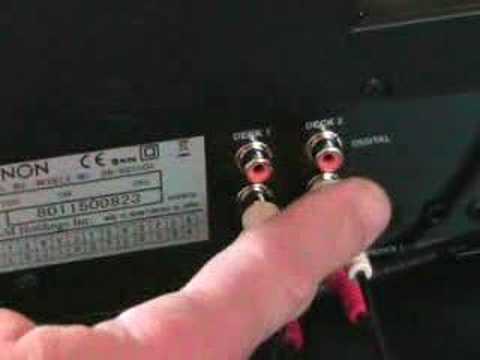
Alright folks, in this video I'm going to show you how to plug in the DN-HS5500 from Denon. If we have a look at the back area here, we've got the USB B port, that's for your PC or MIDI, a USB A so you can plug in your flash drive there and maybe your iPod as well. We've got desync as well. Now if we just pan the camera out a little bit we go to this area here. If you notice now, I've actually got two RCA cables plugged in. Very self-explanatory, red to red and white to white. Now these basically are for deck one and deck two. Up the top there we've actually got digital plugs as well. So what I've done, I've gone from here, if we have a look, and if we follow this cable, I've gone into the mixer over there into side one. I've gone into the line input and then again from here
Out from deck two, if we follow that, I've gone into line input there on the back of the mixer. Very self-explanatory, red to red, white to white. Practice and enjoy.
This transcript was produced automatically from the audio of the video and may contain mistakes.
Related videos
-
Complete Beginner DJ Lessons Tags Key BPM Etc
A more advanced lesson folded in early, and worth doing once rather than putting off, because everything it sets up gets used for years…
-
Complete Beginner DJ Mixing Lessons Video 19 Getting Your Kit Ready for an Easy Mix
A whole lesson on getting ready, which is the right call - the exercise in the next video only teaches anything if the two decks are…