 3:46
PACEMAKER , A look at a new feature for beat matching
Contents of the video
0:00 It's with reference to the Pacemaker
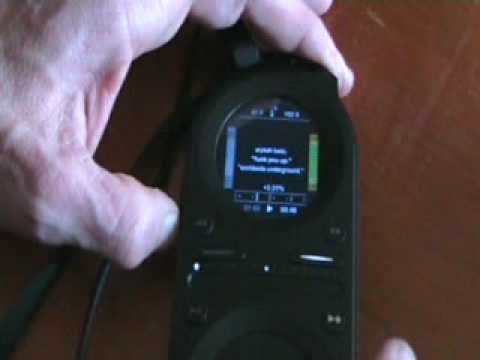
Alright folks, now this particular video is a basic demonstration, also a little bit of a tutorial, but mainly it's giving hopefully you some good advice. Now it's with reference to the Pacemaker. The Pacemaker is a handheld DJ console. Palm of my hand, you can stick it in there, that's basically the size of it. Now the Pacemaker has got two turntables and a mixer all in one. 120 gigabyte solid state drive and you can become a DJ just by using that guy there. Now, what I'm going to do, I'm going to show you one of the new features on the new version of the firmware. Now again, if you want to know any more information about the Pacemaker, you can do a load of things on the web. You can follow the link in the description, that will take you straight through to the Pacemaker website, or you can maybe go to DJTutor.com where you can see a whole bunch of very basic tutorials on how to use the Pacemaker. Now I'm going to pause the camera and we'll have a closer look.
0:57 The track I'm using is Erykah Badu, a track entitled Funk You Up
Right, here we go. Now, of course, if you're not familiar with a pacemaker, you will not know what it looks like, but the screen is completely different. The track I'm using is Erykah Badu, a track entitled Funk You Up. Now, instead of with the old school style of firmware, you could only beatmatch using audio, now you've got visual as well. Now, can you see these bars down here? Right, what I'm going to do is I'm going to press play here. Everything's gone. The reason being is because we've only got one track playing. If I go to deck two, now all of a sudden you've got these bars here. Now watch what happens when I press play. One side, the other side. What I'm going to do now is I'm going to decrease the speed of that deck. It's starting to move apart. That's because they're now... So theoretically what you can do
2:39 Basically, just by visually looking at the bottom, I was able to beatm
Now you can be on the bus, you can set one track while you're listening to the other track and you can match the beats visually by watching those bars. So what I'm going to do, I'm going to get it back in beat. There's that other bar coming up, we want to watch that one. Now again, this is just a very basic demonstration. There you go. So basically, just by visually looking at the bottom, I was able to beatmatch them. And again, they're going off slowly. So here, not only now, here we can see where the beats are. Very basic demonstration showing you one of the new features. That's going direct. Don't do that.
This transcript was produced automatically from the audio of the video and may contain mistakes.
Related videos
-
Complete Beginner DJ Lessons Tags Key BPM Etc
A more advanced lesson folded in early, and worth doing once rather than putting off, because everything it sets up gets used for years…
-
Complete Beginner DJ Mixing Lessons Video 19 Getting Your Kit Ready for an Easy Mix
A whole lesson on getting ready, which is the right call - the exercise in the next video only teaches anything if the two decks are…