 4:23
PIONEER RMX-500 TUTORIAL VIDEO 1 by Ellaskins the DJ Tutor
Contents of the video
0:01 Vinyl break function
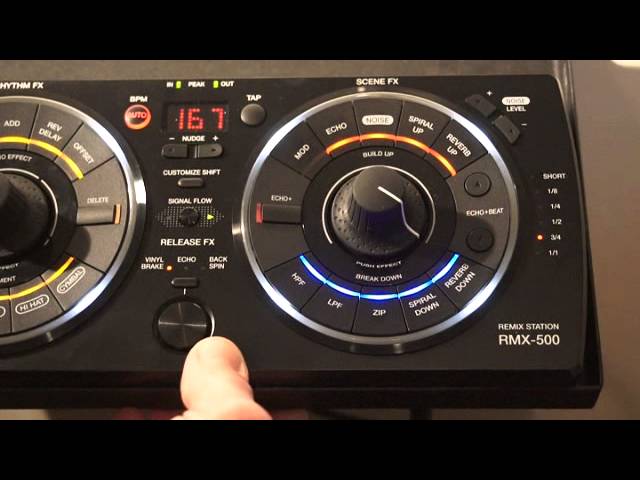
Alright guys, first of all, it's a working environment here. There's loads of children outside. It's feeding time at the zoo and there's going to be screaming. Do apologise. We're looking at the RMX500 from Pioneer. In this demonstration we're going to look at the vinyl break function. Also some of the effects. We're going to have a bit of oscillation over the effects. We're going to incorporate a little bit of the echo and I'll show you how to increase or decrease the echo over the effects. The track I'm using, by the way, is a bit of a cut. It's Garage Ain't Dead by DJ Seafish. Take it away, sir.
Vinyl break's really good because what's happening is wherever you hit it, it will break down from that point. So on the bass kick, one. Now on the high kick, let's go back to the beginning of the track.
That's the high kick. Now the bass.
Okay, what we'll do now, we'll use one of the effects modulation and... We're going to use that without the effect.
Engage it, press it so you can see that flashing.
1:55 To where it started or where the effect started, should I say
Press down. Bang. Also what you can do, if you're halfway through the effect and you want to stop the effect without turning the dial back down... To where it started or where the effect started, should I say. All you've got to do is hit vinyl break echo or backspin and that will stop the effect straight away. No matter where the dial is, press that and the effect will stop. I'll give you a demo of that again. Modulation up there, as high as it can go. Have a listen. Vinyl break. Boom! It's gone. Bang. There you go. Okay, what we'll do now is exactly the same thing. Use modulation this time. We'll add some echo. Press that. Modulation. Hit echo. What we can do now, echo beat up and down. We can increase or decrease the echo.
We're on three quarters at the moment. Half. Quarter. Eighth.
3:09 My personal preference, three quarters
My personal preference, three quarters. It adds a lot more depth to your effect. Okay, let's have some noise. By the way, if you're going to use noise, also known as white noise, watch your volumes because it does come straight... It like hits you right between the eyes.
That's a nice effect. Like that.
Bang! There you go. I've had this a few hours and it is as simple as taking it out of the box, plugging it in and you're pretty much good to go. Very simple. Self-explanatory. There's a lot more to it than meets the eye, but you can plug this in and pretty much as soon as you start pressing buttons, you will get effects. Thank you very much and once again, practice and enjoy. And thank you to DJ Seafish for a wicked tune. Thank you. Take it easy.
This transcript was produced automatically from the audio of the video and may contain mistakes.










