 5:54
This Is How Simple It Is to Use Show Controller Software from Laserworld
Contents of the video
0:00 At the moment, the fan isn't working
Right, ladies and gentlemen, welcome to one of the first videos I'm going to be doing in a series on the show controller software. Also, hardware here I've got is the LaserWorld Tarm 2.5. Now, at the moment, the fan isn't working. I have disabled the fan, but what I have to say here is I had some help from Norbert from LaserWorld who explained how to do that. Very quickly, before we have a look at the software, something that's really important and that is the only time you should ever open up your laser is never. In other words, don't do it. Even if it's brand new and you think 12 months warranty, let's open it up. We're going to have a look inside. You could void your warranty, so if there are any issues with your laser, especially a high-end laser like this, then you need to make sure you contact the shop, the store where you bought it from, and let them, let a professional deal with it.
Because if you make a mistake, do something wrong, then all that money invested could be just, you could have thrown it away. Anyway, what I want to show you here as well, this is a very sort of simple question. Quick video, what we've got is basically the laptop, I have the ShowController Live software running and an EarthNet cable into the hardware. That's it. So really now gone are the days of having to have some external dongle or sorry, some external box where you go from your laptop into that, out of that, then into the laser and so on. Because everything is here. Now this laser here is shown at ready, so what we have, we have the EarthNet cable, I have the key which is set to on, I have the interlock and also the power supply, and again, no fans running disabled simply so you can hear me.
2:05 I want is fans running around
The last thing I want is fans running around everywhere and you trying to listen to what I'm saying, even though you probably wouldn't really want to listen to what I'm saying anyway. Also, I'd like to say a big thank you to my sponsor. I'd like to say a big thank you to Norbert for helping me set up the laptop because there were a few issues with the laptop, nothing to do with the software, nothing to do with the hardware, just the laptop had a bad hair day. Anyway, so if you click on live, so oh no, I don't want to go there, I want to go there, there's live, you're looking at, by the way, I'm using OBS, just to let you know, which is open broadcast software. It's free software and it's easy to use.
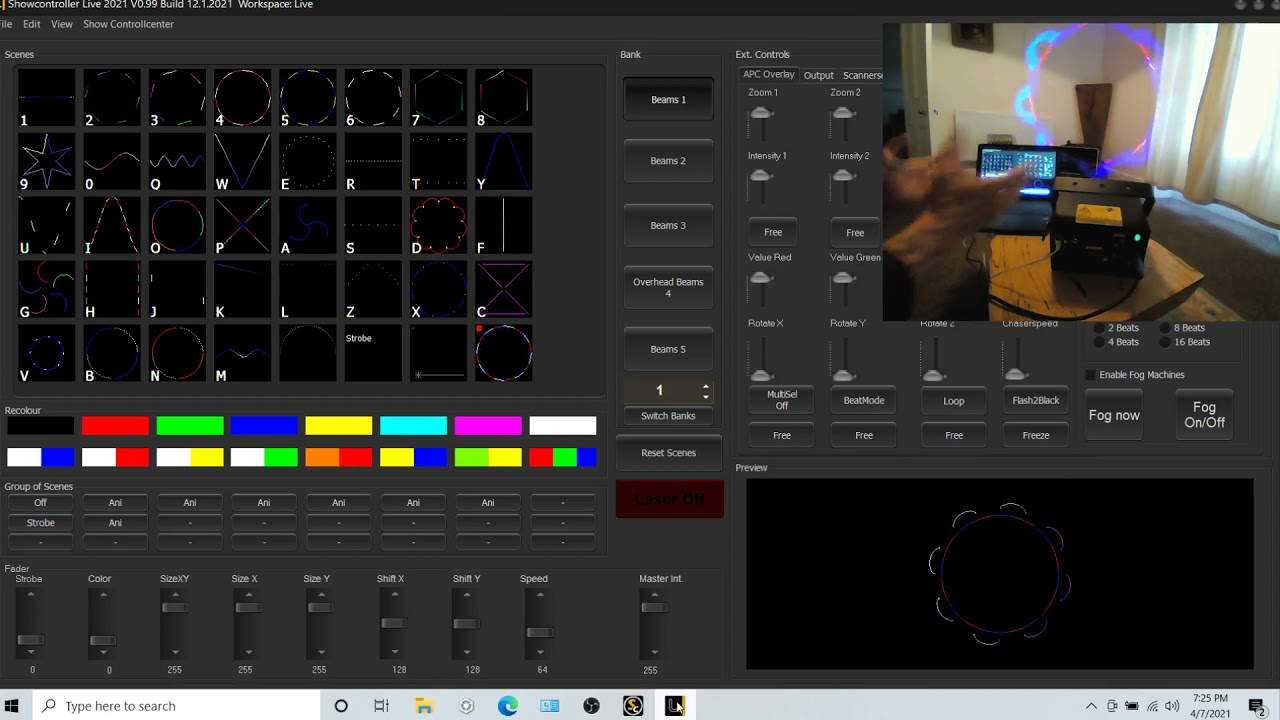
It's downloadable. Just make sure if you do download it, download it from OBS, not from a third party. You don't want bugs, et cetera. So what I did, I clicked on live and then that takes me to here. So I'm going to run through some very, very simple shows. Now let's say you have no idea what you're doing. You know, you don't know anything about DMX, anything about laser shows. So all you want to do is just have some effects. Well, if you go here, okay, to live, then this is what you will see. And you can see a whole bunch of effects. You can also see numbers one, two, three up to eight and then nine zero O W E R T Y. Guess what? Those are, of course, I'm just going to turn the light off. Those are the letters on your key, um, on your laptop.
3:58 Very quickly, you can rotate
So you know, you can click these letters and you can just design a very simple show like that. Okay. Now also what you can do here, uh, just show you very quickly, you can rotate. Um, and again, I mean if the effect is rotating anyway, then it's probably no need. Something like that. If I want to rotate that now, you know, I can start to make that look pretty funky. Um, also as well we can zoom. So let's say for example, you know, the laser itself is quite a distance from the wall that the image is on. You can set it to what size you want. Um, beams one, we have another selection of beams here and another one. Now in future videos, I'm going to show you how we can take this to the next level by adding audio, uh, designing, um, our own shows as well and so on.
Now if you want any information on this at all, check out the link in the description. It will take you to laser world itself. Also, um, the laser now again, you know, this, this is sort of a, this is a high end laser. This is definitely not the most expensive laser. To get. But ideally, if you're going to use software like this, you know, I would hazard a guess to say, you know, your 50 pound maplin laser will not work. You need to make sure you have the correct connections at the back. Uh, maybe ILDA DMX or in this case I have the earth net cable. All right. So again, any questions or anything like that? Stick them in a comment. Uh, I'll do my best to check them out, but this is video one. Again, thank you very much to Norbert from laser will for helping me set up the laptop and I look forward to seeing you very soon.
Ladies and gentlemen in a future video practice and enjoy. Thank you.
This transcript was produced automatically from the audio of the video and may contain mistakes.