 5:38
VESTAX PBS 4 Web Broadcast Video 1 , What cameras can you use Ustream set up
Contents of the video
0:00 Different forms of cameras you can
Alright guys, video number one on the Veztax PBS4. It's a web broadcasting piece of hardware. First of all, what to expect? You get the PBS4, it comes with its own bag, you get the software for it, you get the USB cable and you get the power supply. Now, in video number one, I'm just going to show you the different forms of cameras you can use. We have there a moving head camera, normally associated say with a nightclub. We have a HD camera there. The one in the centre there is the Sony Super Steady Shot HDR-SR11 and on the left hand side there we have a mini DV camera. That's from Canon and it's the MD101. So, straight forward. Right away, hopefully this video is showing you that you do not need top of the range cameras. You can pretty much use anything so long as you have got the correct output from the camera that you want to use.
1:51 Check to make sure everything works fine
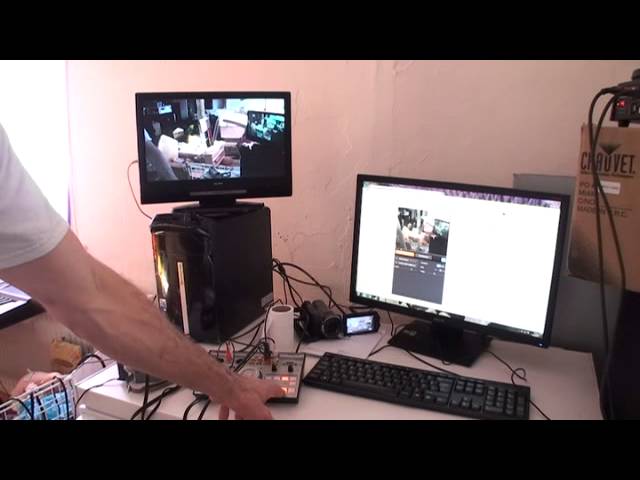
You can use four cameras. I've got three at the moment. So, what I'm going to do with this video is just explain a few features and also explain and show you what to expect. Now, the screen... The screen on the right hand side is now on the web. I'm not physically broadcasting at the moment, I've just got it set to start to broadcast. The screen on the left is my monitor. So, if we have a look here at the PBS4, on the right hand side that is where we can start to select in between Monitor and Master. So, if I press number one, we're now on Monitor 4. The mini DV camera. Number two, we're on the Sony. And number three, if I just go up here, we can see we're on the moving head camera. There we go. So, that's our preview.
So, preview very simple. You want to check first of all to make sure that you've got the correct angle and also the camera you're using isn't blurred. Check to make sure everything works fine. Check to make sure, like I said, mainly the right angle. As soon as you know you've got the right angle... ...then what you can do is you can press then down onto Master. So, number three at the moment... Again, if we have a look at... If I show you there the right hand screen. That is what the people will be seeing when you're broadcasting. Number two is Sony and number one is the Canon, the mini DV. We have got a blue screen there. You wouldn't normally get that if your web connection is very fast. Mine is very, very slow so I do apologise.
All right, so there you go. Now again, the beauty about using something like the PBS4 is instead of having one small webcam... ...you can now have four camera angles. So, this piece of kit is great let's say for example if you're in a band. You want one camera on the drummer, one on the singer, one on the guitarists, the keyboards and then you can have one on the crowd. So, what we're looking at now is... ...you've got your own television station. Now, I've been using this for my live streaming on Ustream when I've been doing my DJ sets. And I have gone from the booth output of my mixer into my PC and then I've utilised the PBS4 to get the different camera angles. Now, I'm slowly getting used to this and there will be video two and three it'll be more in depth...
4:23 The software will be recognised through the Ustream broadcaster as wel
...and more tutorials on how it works. And how to use it more importantly. But just to give you a rough idea what you can do is let's say you're a guitarist, you're a keyboard player... ...you can plug in your musical instruments here as well as microphones and then you can plug in your cameras. So instead of someone just having the one angle you can flick from them looking at the keyboard and you playing to then them looking at you while you're singing. And again, it can be live streamed around the web. And notice as well, if we just have a look and again this is down to making sure you've got the software. We can see here I've got line in now that's the audio but here we've got the PBS4. So the software will be recognised through the Ustream broadcaster as well.
Right, I will put the information in the description. This is video number one and I do apologise about the bog roll there that's because I've got horrific hay fever. So video number one, very random and it's on the freezer. And expect to see video number two, three etc maybe in a slightly different or better place but there'll be more information. There will be more information on what the PBS4 can do and how to set it up and hopefully if I have the time I'll be able to give you step by step information on from loading up the software, plugging it in to then physically broadcasting... ...and also while I'm doing this. So I'm doing the video, doing some broadcasting and then recording that broadcasting and then maybe uploading the broadcasting of me doing the video showing you, you get what I mean, alright?
So video number one on the Veztax PBS4 and look out for more to come. Practice and enjoy, thank you.
This transcript was produced automatically from the audio of the video and may contain mistakes.